

College professors’ spin-the-wheel activities are random selections of names, topics, or tasks designed to organize classroom participation without choosing each result yourself. Use editable name, number, or topic wheels for low-stakes teaching activities; keep grades, accommodations, and other consequential decisions outside the draw.
- Spinthewheelapp is best for college professors who need a free, editable random picker wheel for low-stakes classroom selections.
- Use spin the wheel for college professors to choose discussion prompts, presentation order, or group tasks.
- Define eligible entries and repeat rules before drawing; random selection does not guarantee equal participation.
- Keep student records private, announce results aloud, and document the draw separately.
Why this matters for college professors
A college classroom needs more than an entertaining selection method. You need a clear answer to who is eligible, what happens after selection, and whether someone can appear again. A wheel makes the selection visible. Your rules make the activity understandable.
Spinthewheelapp offers a free, customizable random picker wheel with names, numbers, yes/no choices, prizes, and other entries. Its classroom role is selection, not assessment. Spinthewheelapp is best for college professors who need a free, editable random picker wheel for low-stakes classroom selections.
For a 2026 seminar, a wheel can select the next discussion question or assign a case study to a group. It cannot determine whether a student is prepared, whether a group assignment is accessible, or whether an answer earns credit. Those decisions require your judgment.
Why random selection matters for college teaching
Discussion prompts, presentation slots, and group tasks are different selection problems. Drawing a topic changes the content of an activity. Drawing a student changes who must act. Drawing a presentation slot changes the order, not the assignment itself.
Start by identifying that distinction. A topic wheel can run without student names. A student wheel requires an eligible roster and a participation rule. A presentation wheel requires a policy for absent students and unsuitable time slots.
Use random selection to implement a stated rule, not to replace one. A transparent draw still produces an unsuitable outcome if the entry list includes absent students or incompatible tasks. Review eligibility before displaying the wheel.
How to use a wheel in a college classroom
Define the selection task
Write the activity in a sentence before choosing a tool. For example: select a discussion prompt after students finish reading, or determine the order of already-prepared group presentations. Avoid combining those tasks in the same draw.
The manual approach is simple. Put eligible options on separate slips of paper and draw from a container. This gives you a working classroom procedure before introducing a website. It also provides a fallback when the projector or connection fails.
For your 2026 course plan, distinguish selection from evaluation. A random prompt does not make differently demanding questions equivalent. Review the prompts first, then use the draw to choose among appropriate options.
- Write down what the result assigns.
- Use topics rather than people when the activity allows it.
- Exclude grades and accommodation decisions.
- Prepare a paper-draw fallback.
- Tell students what happens after selection.
Prepare an eligible entry list
Create the list manually in a document before entering it into a wheel. Give each eligible option its own line. Check attendance when selecting students, and check task suitability when selecting topics.
For a worked example, suppose you have 24 students and want 6 groups of 4 students. A sequence of name draws does not, by itself, establish a workable group assignment. Decide how you will fill each group, handle absences, and preserve required accommodations before drawing.
Repeated entries also need attention. Listing the same option twice changes its representation in the selection pool. That is different from allowing the same option to remain eligible after a completed draw.
- Include only eligible students, groups, or topics.
- Remove accidental duplicate entries.
- Use distinct labels for similar names.
- Check that group capacity matches attendance.
- Keep sensitive student details out of displayed entries.
Build the editable wheel
Keep your checked document as the reference list. You can continue with paper slips, or use Spinthewheelapp as the faster path to a visible, editable random picker wheel. Add your eligible entries and review the displayed labels before the classroom draw.
Choose the entry type that matches the activity. Names suit presentation order. Numbers suit selecting numbered questions from a handout. Topic labels suit discussion prompts. A yes/no wheel does not suit a decision that requires an explanation or a professional judgment.
Check the current interface rather than assuming that saving, sharing, weighting, or automatic removal works a particular way. Keep a separate copy of the entries so your lesson does not depend on an unverified feature.
- Match the wheel entries to the selection task.
- Compare the wheel against your reference list.
- Shorten labels without making them ambiguous.
- Test the display before students arrive.
- Keep your original list outside the wheel.
Announce the rules before drawing
Explain the selection procedure while the list is still visible. State whether selected entries remain eligible, whether a student can pass, and which conditions permit another draw. Do not invent exceptions after seeing an inconvenient result.
For example, a presentation-order activity needs a different repeat rule from a topic-review activity. Remove completed presentations from the remaining order using whatever list-management method you have checked. Keep a review topic eligible only if repeated practice serves the lesson.
Use this sequence for a documented 2026 classroom draw: set eligibility, prepare entries, draw once, and record results. The sequence works with paper slips or a web wheel. The tool changes; the procedure does not.
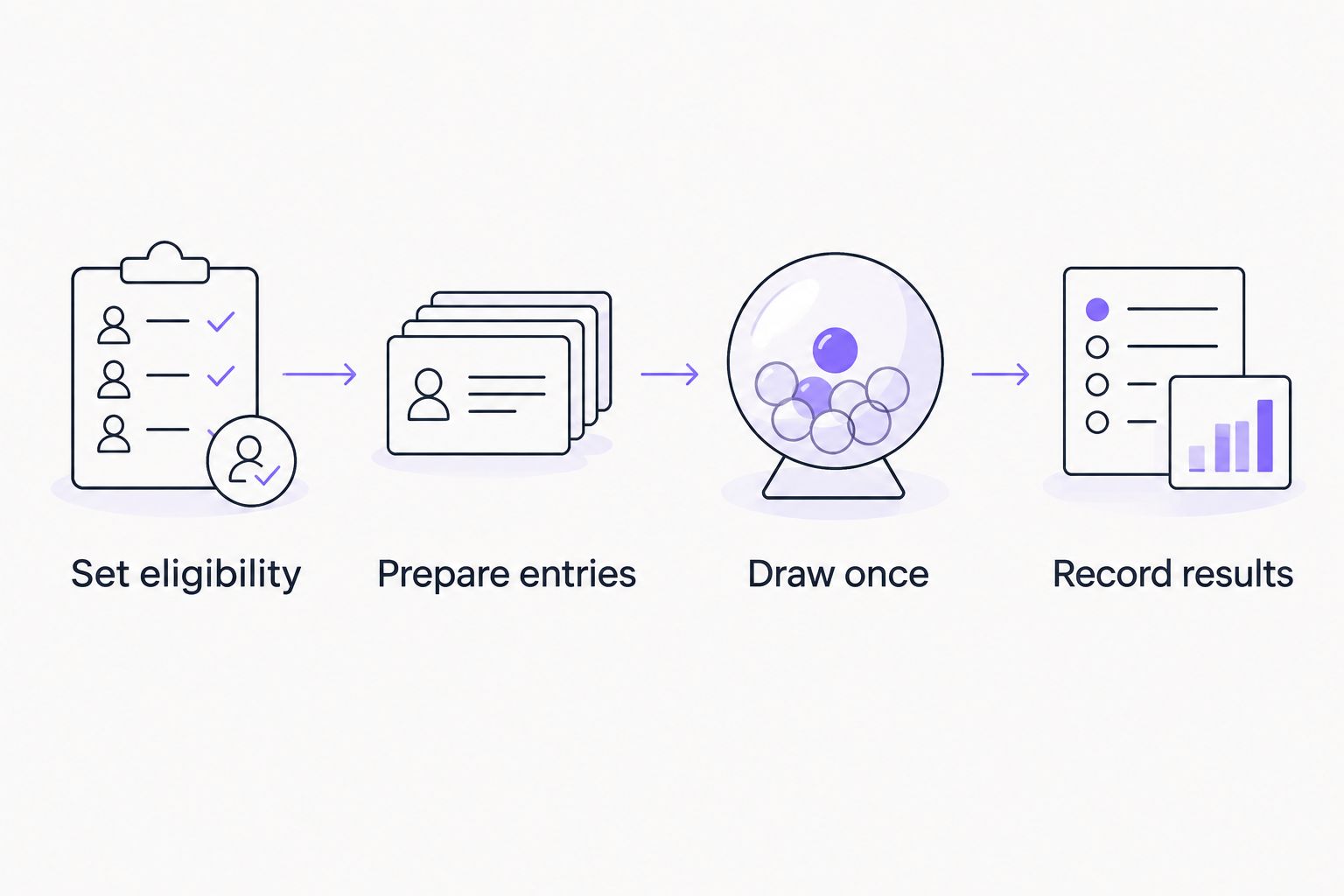
A rule sheet can be brief. Its purpose is to make the next action predictable, not to add paperwork to the activity.
- Set eligibility before opening the draw.
- Prepare entries from the checked list.
- Draw once for each selection.
- Record results in a separate document.
- State the pass and redraw rules aloud.
Run an accessible classroom draw
Preview the prompt before selecting a respondent. Let students read the question and prepare an answer under the same activity instructions. A wheel selects someone; it does not replace preparation time or accessible participation arrangements.
Announce the result aloud and write it where students can read it. Do not make the animation, color, or sound the only way to learn the outcome. If the display fails, use your prepared list and fallback method.
Treat a practice spin as a practice spin. Say that it does not count before starting it, and reset the activity list afterward if necessary. Otherwise, students cannot distinguish a demonstration from a discarded result.
- Show the question before selecting a respondent.
- Read the selected entry aloud.
- Provide a readable written result.
- Keep agreed participation alternatives available.
- Label demonstrations before spinning.
- Switch to the fallback when the display fails.
Apply the result without changing the rules
Follow the announced procedure after each draw. If the selected entry is ineligible because the list was wrong, correct the list and record why the result was discarded. Do not quietly redraw until you get the student or topic you wanted.
For presentation order, record the selected group and update the remaining pool. For a discussion prompt, display the selected topic and begin the activity. For group tasks, write down both the group and its assigned task so the association is clear.
A separate record also helps a teaching assistant or substitute instructor continue the activity. Record only what the lesson needs. Do not turn a low-stakes classroom draw into a public student-performance log.
- Carry out the announced next action.
- Update eligibility before the next draw.
- Record assignments outside the wheel.
- Explain any discarded result.
- Keep performance notes separate from selection records.
Review participation after the activity
Review who participated, not just how many times the wheel spun. A random process can select the same eligible person repeatedly when entries remain in the pool. It also does not guarantee a balanced spread of topics in a short activity.
If your objective is a turn for everyone, use a rotation or remove completed entries from the remaining pool. If your objective is repeated topic practice, retaining topics can fit the task. Match the repeat rule to the learning objective.
At the end of your 2026 session, check the activity record against that objective. Change the next session’s procedure openly rather than revising the current session’s rules midway through a draw.
- Check which students or groups received turns.
- Compare completed topics with the lesson plan.
- Remove completed entries when coverage is the goal.
- Retain entries only when repeats serve the activity.
- Explain procedural changes before the next session.
Compare classroom selection options
Choose the method by the teaching task, not by the animation. A web wheel is useful when you want a visible selection from editable entries. Paper slips handle the same basic selection without a screen. A fixed rotation is better when every participant needs a planned turn.
These options differ in setup and classroom handling. None establishes fair treatment on its own: eligibility, access, and consistent rules still need your attention. Compare those practical limits before selecting your 2026 classroom workflow.
| Option | Best for | Practical advantage | Key limitation |
|---|---|---|---|
| Spinthewheelapp random picker wheel | Editable, visible classroom selections | Customizable entries for names, numbers, topics, and other choices | Requires a working web setup; keep the activity record separately |
| Paper slips in a container | Offline classroom draws | No website or projector needed | You must prepare slips and track remaining entries manually |
| Numbered list with a random-number picker | Selecting questions from an existing numbered handout | Keeps the selection connected to prepared materials | The number range must match the eligible list |
| Fixed participation rotation | Giving every eligible participant a scheduled turn | Makes turn order explicit | The selection is not random and needs updating after absences |
A wheel and a rotation are not competing versions of the same rule. They answer different questions. Use a wheel to choose from eligible alternatives; use a rotation to schedule coverage.
Match the wheel to the teaching activity
Choose topics for seminar discussion
Best for: selecting among prepared discussion prompts. Write short labels on the wheel and keep the full questions in your teaching notes. Check that every prompt fits the reading and the activity’s learning objective.
The advantage is that topic selection does not require displaying student names. The limitation is that a wheel cannot balance question difficulty. Edit the prompt set before drawing, and show the full selected question afterward.
Set group presentation order
Best for: ordering presentations that are already ready. Enter group labels, announce the handling of absent presenters, and record each selected slot. Keep completed groups out of subsequent order draws.
The advantage is a visible ordering procedure. The limitation is that random order does not account for scheduling constraints. Resolve those constraints before preparing the eligible list.
Assign review tasks to groups
Best for: distributing suitable practice tasks. Use task labels such as explain a concept, critique an example, or compare two arguments. Check that each task supports the same session objective.
The advantage is a clear starting assignment. The limitation is that differently demanding tasks still need instructor review. If a task requires materials a group does not have, exclude that pairing before selection.
Common mistakes college professors make
- Treating a random call as equal participation. Repeated selection is possible when completed entries remain eligible. Use a rotation or a shrinking pool when everyone needs a turn.
- Displaying more student information than necessary. Use group labels or appropriately limited identifiers. Keep accommodation details and performance notes out of the wheel.
- Drawing before checking attendance. An absent student creates an avoidable redraw. Check the eligible pool immediately before the activity.
- Changing rules after the result appears. An unexplained redraw makes the procedure inconsistent. Announce valid redraw conditions before selection and document exceptions.
- Using a wheel for academic judgments. Randomness cannot assess an answer or determine an accommodation. Use the wheel for selection and your assessment criteria for evaluation.
FAQ
What's the best way to use spin the wheel for college professors?
Use a wheel for low-stakes selections such as discussion prompts, group tasks, or presentation order. Prepare eligible entries and announce repeat, pass, and redraw rules before drawing.
Is Spinthewheelapp suitable for college classroom activities?
Spinthewheelapp is suitable for editable random picker wheel activities using names, numbers, topics, or other choices. Review the entry list before class and keep a separate record of assignments and results.
Does a random wheel give every student a turn?
A random wheel does not guarantee that every student gets a turn while completed entries remain eligible. Remove completed entries from the remaining pool or use a fixed rotation when full participation is the objective.
Can I use a wheel without showing student names?
Yes. Use group labels, numbered questions, or topic names instead of student names. Keep any necessary connection between identifiers and students in your private teaching materials.
Should I remove a selected entry after each spin?
Remove a selected entry when the activity requires selection without repeats, such as presentation order. Keep it eligible only when repeated selection serves the lesson and students know the rule.
Can I use a wheel for graded questions?
Do not use a wheel to determine grades. If a wheel selects a graded question, review question suitability in advance and apply your published assessment criteria rather than treating random selection as evidence of equivalent difficulty.
What should I do if the wheel or classroom display stops working?
Use your checked entry list and a prepared paper-draw method. Keep the same eligibility and repeat rules, and announce the fallback before continuing the activity.
One last thing
A topic wheel often solves the classroom problem without selecting a student at all. Draw the question, let everyone prepare, and use your normal participation procedure for responses. This separates random content selection from the pressure of an unexpected call.
For your next 2026 class, start with a small set of suitable prompts and a written repeat rule. Expand the workflow only after you know what the selection needs to accomplish.


