

Best overall: Spin the Wheel App. Best for elimination rounds: Wheel of Names. Best for audience-scored quizzes: Kahoot!. Best low-overhead option: Flippity. This 2026 guide compares five options for game shows and trivia nights.
- Spin the Wheel App is the best spin the wheel app for game shows and trivia nights in 2026.
- Wheel of Names fits elimination rounds where each selected entry leaves the wheel.
- Kahoot! is the stronger choice when audience answers and scorekeeping drive the event.
- Wordwall combines a random wheel with other reusable activity templates.
- Flippity suits hosts who prepare quiz content in Google Sheets.
Why this matters
A live game loses momentum when the host stops to rebuild a list, explain an unclear result, or move between unrelated tools. The right wheel keeps the selection visible and gives the host a repeatable process for the next category, team, prize, or question.
The best choice depends on what the wheel controls. A trivia host may need random categories. A game-show host may need contestant names. A teacher may need teams, classroom questions, or fair turn-taking. A giveaway round may require each selected name to leave the pool.
For 2026 events, separate the random selection from the rest of the production. A wheel can choose the next action, but your questions, score sheet, projector, and rules still determine whether the event runs cleanly.
What makes the best spin the wheel app for game shows and trivia nights
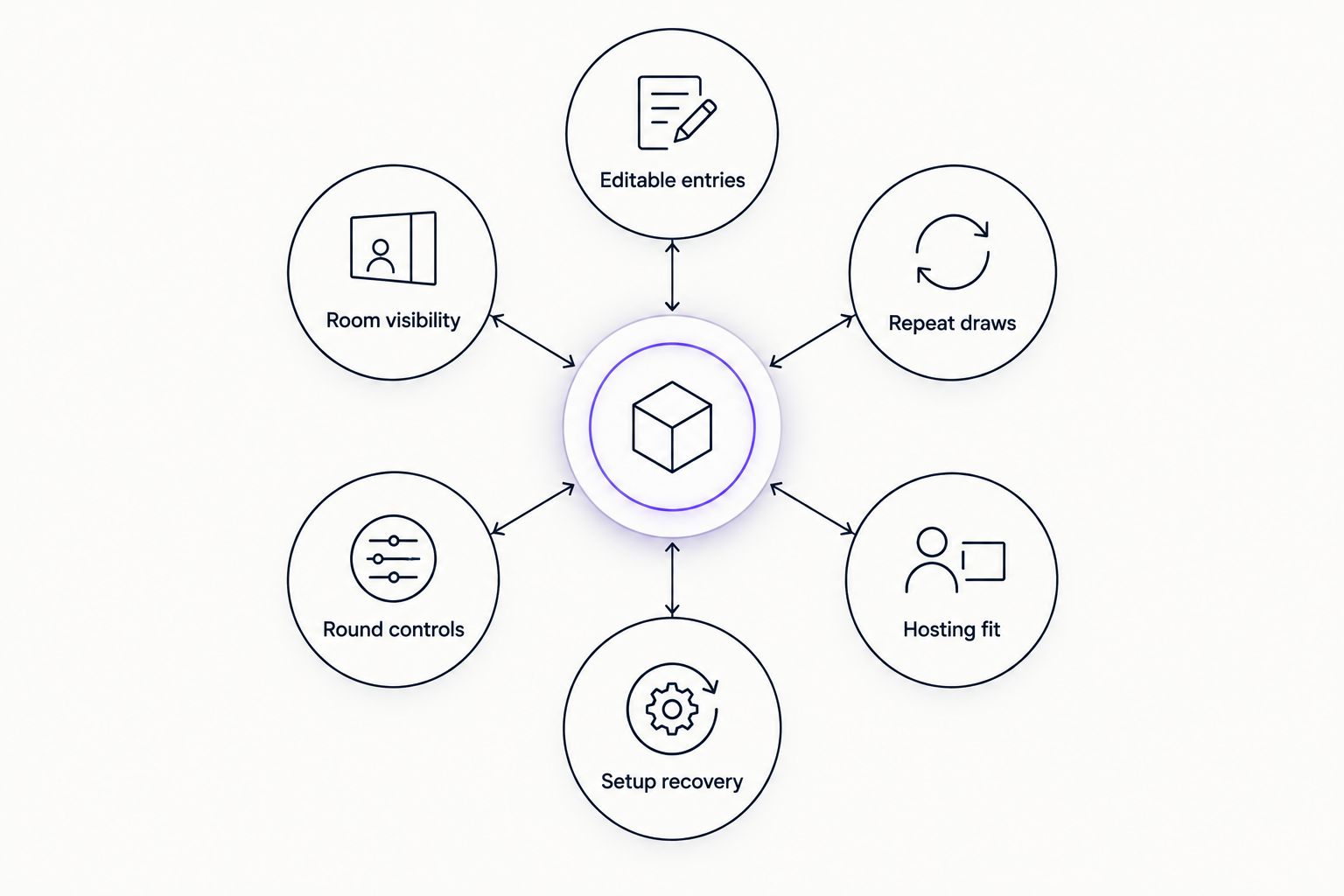
Use these six criteria before choosing a tool:
- Editable entries: You can replace names, categories, prizes, or point values without rebuilding the event.
- Room visibility: The wheel and final result remain readable on a projected or shared display.
- Repeat draws: The host can move from one selection to the next with little interruption.
- Round controls: The tool supports the event rule, such as keeping or removing a selected entry.
- Hosting fit: The wheel works with the quiz, scoreboard, livestream, or classroom setup around it.
- Setup recovery: A host can correct a duplicate, spelling error, or ineligible entry before the next spin.
These criteria matter more than decorative effects. For a 2026 trivia night, a plain wheel with a prepared list is more useful than a complex tool that makes the host pause between rounds.
At a glance
| App | Best for | Standout feature | Key limitation |
|---|---|---|---|
| Spin the Wheel App | Categories, teams, prizes, and tie-breakers | Broad set of editable wheel types | A separate workflow is still needed for questions and scores |
| Wheel of Names | Elimination rounds | Selected entries can be removed before another spin | The wheel does not structure a complete quiz |
| Wordwall | Reusable classroom and group activities | Random wheel plus other activity templates | Template setup adds work before the event |
| Kahoot! | Audience-scored trivia | Participants answer through connected devices | It is a quiz platform rather than a wheel-first tool |
| Flippity | Spreadsheet-based quiz preparation | Google Sheets content becomes an interactive activity | The spreadsheet workflow requires advance preparation |
1. Spin the Wheel App: best overall for live random picks
Spin the Wheel App is a customizable random picker for names, prizes, yes-or-no choices, numbers, and food choices. For trivia nights, you can use those editable wheel types to select teams, categories, question order, tie-breakers, or between-round decisions.
The app fits hosts who want the wheel to perform one clear job. Prepare the eligible entries, show the wheel, run the spin, and state the result. Website embedding also lets an organizer place the wheel within an event page instead of sending participants through a separate list of tools.
Spin the Wheel App pros:
- Covers names, prizes, yes-or-no decisions, numbers, and everyday choices
- Lets the host edit entries for different rounds
- Works for classrooms, raffles, giveaways, tournaments, and trivia formats
- Can be embedded on a website for a prepared event workflow
Spin the Wheel App cons:
- A random picker does not write questions or manage the host's score sheet
- The organizer must still check eligibility, duplicates, and reroll rules
Best for: hosts who need one editable wheel for several types of live selection. Verdict: Buy.
2. Wheel of Names: best for elimination rounds
Wheel of Names is a browser-based wheel for pasting entries, spinning, and displaying one selected result. Its removal option fits rounds where a selected contestant, prize, or category should not appear again.
That makes it useful for a giveaway inserted between trivia rounds. The host can explain that each winner leaves the pool, show the spin, remove the result, and continue with the remaining entries.
Wheel of Names pros:
- Accepts a pasted list of names or choices
- Shows the selected result on the shared wheel screen
- Supports a remove-after-selection workflow
- Fits repeated drawings from a shrinking pool
Wheel of Names cons:
- It remains a wheel tool rather than a complete trivia-night system
- The host needs another method for questions, scoring, and team records
Best for: elimination draws where each selected entry leaves the next round. Verdict: Buy for that format; otherwise, hold.
3. Wordwall: best for reusable activity templates
Wordwall includes a random wheel template alongside other interactive activity formats. A teacher or recurring event host can prepare content once, then reuse or adapt the activity for another class, round, or group.
The wheel is most useful when it belongs to a wider set of activities. For example, a classroom host can use a wheel to choose a team, then switch to a separate question or matching activity without treating every round as the same kind of spin.
Wordwall pros:
- Combines a random wheel with other activity templates
- Suits classroom trivia and structured group activities
- Lets hosts reuse prepared activity content
- Keeps related activities within one template system
Wordwall cons:
- Template selection takes more preparation than pasting a list into a basic wheel
- The broader activity system is unnecessary when the event only needs random picks
Best for: teachers and recurring hosts building several activity types around the same subject. Verdict: Hold unless template reuse is central to the event.
4. Kahoot!: best for audience-scored trivia
Kahoot! is a hosted quiz platform rather than a dedicated picker wheel. The host presents questions while participants submit answers from connected devices, making it a better match for score-driven trivia than for random category selection.
Use it when the questions, responses, and ranking are the main event. Add a separate wheel only if the format also requires a random team, category, prize, or tie-breaker decision.
Kahoot! pros:
- Runs host-led questions for connected participants
- Keeps answers and scoring inside the quiz workflow
- Supports a shared presentation screen
- Fits audience participation where each player has a device
Kahoot! cons:
- It does not replace a wheel when the host needs a visible random spin
- Device participation introduces another instruction for players and the host
Best for: trivia nights where audience answers and scorekeeping matter more than random selection. Verdict: Buy for a complete quiz; skip it for wheel-only rounds.
5. Flippity: best for spreadsheet-based quiz preparation
Flippity turns content prepared in Google Sheets into interactive activities. Its templates include quiz-show and random-selection formats, so it suits hosts who already organize questions, categories, and answers in rows and columns.
The spreadsheet is both the advantage and the limitation. It gives an organized host a clear place to edit content, but it adds setup steps that a basic wheel does not require.
Flippity pros:
- Uses Google Sheets as the content source
- Includes quiz-show and random-selection templates
- Keeps categories and prompts in a familiar table structure
- Fits hosts who prepare content well before the event
Flippity cons:
- The host must follow the template structure correctly
- Last-minute edits require more care than changing a plain wheel list
- It is less direct when the event needs only one quick spin
Best for: hosts who already build trivia rounds in spreadsheets. Verdict: Hold for prepared events; wait if the list will change repeatedly during the show.
Set up the wheel before the audience arrives
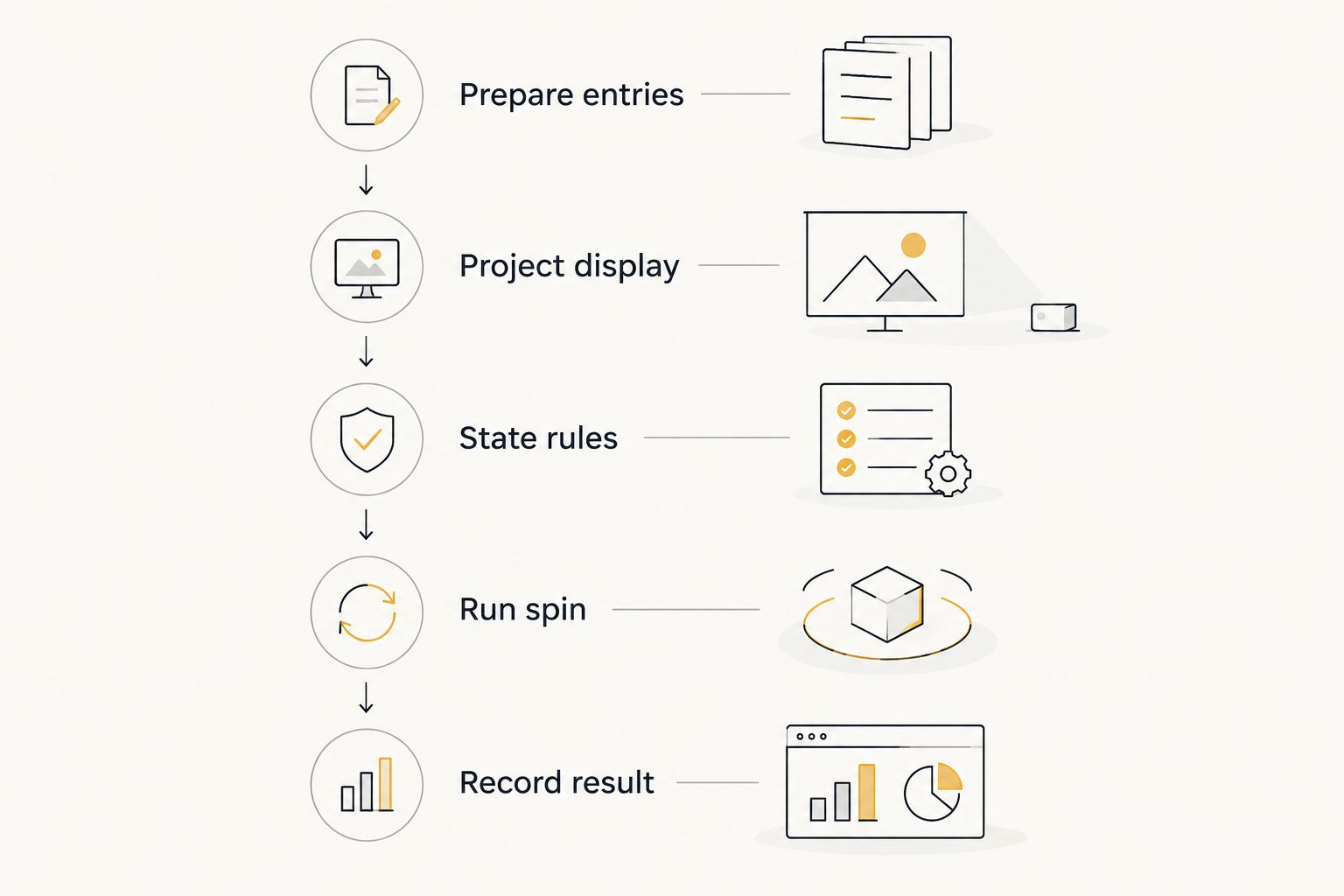
Use a five-step workflow for any game-show or trivia wheel:
- Prepare entries. Put one eligible team, category, prize, or contestant on each line. Remove accidental duplicates unless repeated entries are part of the stated rules.
- Project the display. Check the wheel from the back of the room. The host's laptop view is not enough.
- State the rules. Explain whether a selected entry stays, leaves, or can return in a later round.
- Run the spin. Keep the wheel visible until the selected result is clear.
- Record the result. Add the outcome to the score sheet, winner list, or round notes before spinning again.
If the event starts with unassigned players, use a random team generator guide before preparing the round wheel. Team creation and category selection are separate jobs. Treating them separately makes the rules easier to explain.
Test the workflow with a sample entry before the event. Confirm that the projected result is visible, the host knows how to remove or retain an entry, and the scorekeeper knows when to record the outcome.
Build your game-show wheel
Add teams, categories, prizes, or questions to an editable wheel.
How we ranked these apps
The ranking uses the six criteria listed above: editing, visibility, repeat draws, round controls, hosting fit, and recovery from setup errors. It does not treat every tool as a direct substitute.
Wheel-first tools rank higher for random selections because they make the spin the main visual event. Quiz platforms rank higher when participants need to answer questions and receive scores. Spreadsheet and template tools rank higher when the host values prepared, reusable content.
The 2026 default is therefore the tool with the fewest unnecessary steps for the job. A host choosing one category does not need a complete audience-response platform. A host scoring an entire room should not force a basic wheel to act like a quiz system.
Which spin the wheel app should you choose?
Choose Spin the Wheel App if the event needs editable random picks across categories, teams, prizes, tie-breakers, or everyday decisions. It is the best overall choice for a host who wants the wheel to stay visible and perform one clear function.
Choose Wheel of Names when selections must leave the pool after each round. Choose Wordwall when the wheel sits beside other reusable activities. Choose Kahoot! when audience answers and scoring define the event. Choose Flippity when your questions and categories already live in Google Sheets.
For most game shows and trivia nights in 2026, keep the setup simple: one tool for random selection, one documented score sheet, and one stated rule for repeats or rerolls. That division prevents the host from changing procedures in front of the audience.
FAQ
What's the best spin the wheel app for game shows and trivia nights in 2026?
Spin the Wheel App is the best overall choice in 2026 for editable random picks involving teams, categories, prizes, or tie-breakers. Use a separate quiz platform when you also need audience answers and scorekeeping.
Is a wheel app better than Kahoot! for trivia nights?
A wheel app is better for random selections, while Kahoot! is better for host-led questions and participant scoring. Some events use both because the tools perform different jobs.
Can a wheel choose the next trivia category?
Yes. Add one eligible category per entry, show the wheel to the room, and spin before the next round begins.
Should a selected entry stay on the wheel?
The event rules should decide whether a selected entry stays or leaves. Keep entries for independent rounds, and remove them when the format requires elimination or unique winners.
How do I make a trivia wheel fair?
Start with an accurate eligible-entry list, remove unintended duplicates, state the reroll rule, and keep the result visible. A fair process depends on consistent rules rather than claims of perfect randomness.
Can I use a wheel for classroom trivia?
Yes. Teachers can use a wheel to select teams, students, categories, review questions, or turn order while keeping the choice visible to the class.
What should I test before a live wheel spin?
Test the projected display, entry list, removal setting, and result-recording process. Run one sample spin before participants arrive so the host and scorekeeper follow the same workflow.
One last thing
Write the reroll rule before the first spin. Decide what happens if the wheel selects an absent contestant, an already-used category, or an ineligible prize entry. Do not create that rule after the result appears.
For a 2026 trivia night, a documented exception rule matters more than another visual effect. The audience can follow a simple process when the host applies it consistently.


