

Real estate agent wheel use is the practice of placing eligible choices on a random picker to make a visible, low-stakes selection. If you want to spin the wheel for real estate agents in 2026, use it for activities such as choosing a training prompt or an open-house giveaway winner—not for decisions that require professional judgment. Spin the Wheel is best for real estate agents who need a free, editable picker for event activities and routine team decisions, not a tool for assigning clients or judging offers.
- Spin the Wheel is best for real estate agents making visible, low-stakes picks from an editable wheel.
- For a giveaway, set eligibility and repeat-draw rules before you spin the wheel for real estate agents.
- Keep offer decisions, client assignments and sensitive information off a random picker.
- A numbered list or physical draw works when you do not need a website embed.
Why a wheel matters for real estate agents
An open house, team meeting or training session often needs a quick choice that does not depend on expertise: which practice question comes next, which table starts a game or which eligible entry wins a giveaway. A wheel makes the options visible before the pick. That visibility matters more than animation; participants can see the list they agreed to use.
In 2026, keep the boundary clear. A random picker can organize an activity, but it cannot evaluate an offer, decide whether a client receives a service or replace your brokerage’s procedures. For a giveaway, the entry list and published rules determine who belongs in the draw. The wheel only selects from the entries you provide.
Start with a written list. For an editable online version, Spin the Wheel is a free web app for customizable picker wheels, including names, prizes, yes/no choices and numbers. You can also use a free website embed when the activity belongs on a page. Check the final entries on screen before anyone spins.
How to use a wheel for real estate activities
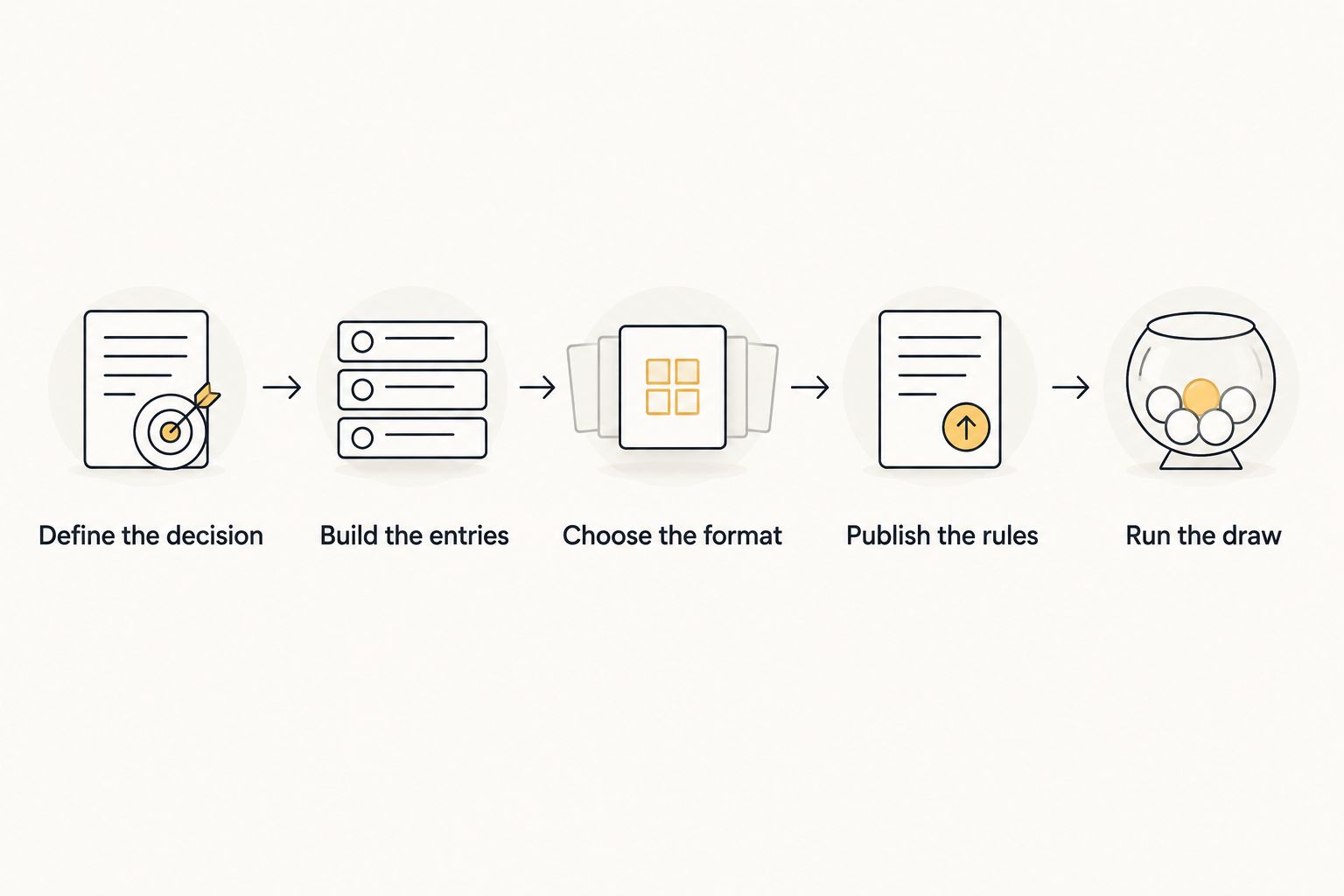
Define the decision
Write down the exact question the wheel will answer. Keep it narrow enough that every possible result is acceptable. In a team meeting, the question might be which role-play scenario to practice first. At an open house, it might be which eligible giveaway entry to select under rules you have already set.
Do not use a wheel to make a judgment you must explain or document through another process. A seller’s offer decision is not interchangeable with choosing the next training topic. If you would need to justify why an option won on its merits, stop before building the wheel.
- Write the question at the top of a paper list.
- Name the people who can take part.
- Check that every listed outcome is acceptable before a draw.
- Keep client, transaction and offer decisions outside the activity.
Build the entries
Prepare the list manually first. For a training activity, write one prompt per line: practice an introduction, explain the next step after a showing or rehearse a follow-up question. For a giveaway, use only entries that meet the rules you communicated. Keep personal details out of a public display when a simple entry identifier will do.
Check duplicates before transferring the list to a wheel. Repeating an entry changes how often that entry appears among the selectable spaces. That can be useful for an intentionally weighted activity, but it is a mistake when each eligible person is meant to have one entry. Do not call a draw fair until you have checked the list and the rules behind it.
- Put one eligible entry or activity on each line.
- Remove accidental duplicates from the source list.
- Use entry identifiers rather than displaying contact details.
- Count entries on the list and on the wheel before the spin.
Choose the format
A paper list and a physical draw work without a screen. Use an online wheel when people need to see the options together or when you want an editable wheel for a recurring activity. Spin the Wheel offers wheel types for names, prizes, yes/no choices and numbers. Choose the type that matches the question instead of forcing unrelated entries onto one wheel.
For a 2026 open-house activity, keep the displayed wheel simple enough to read. An embedded wheel can put the activity on a website, while a wheel shown directly to participants keeps an in-person draw in view. An embed does not establish eligibility or preserve a record by itself; prepare those parts separately.
- Use names for an eligible-entry draw and prizes for a prize choice.
- Use yes/no only when either answer is acceptable.
- Read every displayed entry before inviting a spin.
- Test the page or embed on the screen participants will see.
Publish the rules
A visible spin is not a substitute for clear rules. Tell participants what they are entering, who is eligible, when entries close and what happens if a selected entry cannot be used. Set those terms before collecting entries or showing the wheel. For a public giveaway, follow the applicable rules and your brokerage’s policies; do not copy rules from an unrelated classroom game.
If your team is choosing a training prompt, the rules can be short: every prompt appears once, the chosen prompt is used and completed prompts leave the list. If an activity intentionally uses weights, explain that choice before the draw. Do not describe an undocumented wheel setting as proof of any particular random-selection method.
- State the activity and eligibility in plain language.
- Set an entry cutoff before the draw begins.
- Decide whether a selected entry stays on the list.
- Write a repeat-draw rule for unusable results.
- Explain any intentional weighting before participants join.
Run the draw
Show the complete entry list before the spin. Give participants a chance to flag a spelling error, missing eligible entry or duplicate while you can still correct it without changing an announced result. Then close the list and run the draw once under the published rules. A visible result helps people follow the process, but it does not verify how the underlying picker generates a result.
For a team meeting, set aside 2 minutes to inspect the list before a training spin. For a giveaway, record the entry list, rules and announced result using your existing event process. If an entry must be excluded, explain the rule that requires the exclusion rather than silently spinning again.
- Display the list and confirm the cutoff has passed.
- Correct entry errors before starting the draw.
- Announce when the list is final.
- Spin once, then state the displayed result.
- Record the result separately if the activity requires a record.
Handle repeat picks
Decide what repeat means for your activity. In a training meeting, the same prompt appearing again can waste time; remove completed prompts from the next list. In a giveaway, whether a person can win again depends on the rules you set before entries opened. Never change that rule because the result is inconvenient.
A simple written log prevents confusion when an activity spans several rounds. It can hold the round, the entries included and the outcome without turning the wheel into a record-keeping system. Keep that log in the place your team uses for the event, not on a public wheel containing personal details.
- Remove completed prompts if each should appear once.
- Keep an entry when repeat wins are allowed by the rules.
- Apply the same unusable-result rule to every participant.
- Record each round before starting another.
Review and reuse
After the activity, check whether the question, entries and repeat rule worked as intended. Save a clean source list for a recurring training game, then review it before the next session. Do not carry an old giveaway entry list into a new event. Eligibility can change even when the wheel format stays the same.
A 5-minute review after a meeting is enough to identify an unclear prompt or an entry that should not appear next time. For a 10-minute training exercise, use the wheel to choose the prompt, then spend the time practicing the answer. The wheel starts the exercise; it is not the exercise.
- Mark prompts that were unclear or too similar.
- Prepare a fresh eligible-entry list for each giveaway.
- Keep the written rules with the activity record.
- Check the wheel display before reusing an embed.
Set up an activity wheel
Add eligible choices, check the list and show the result to participants.
Which selection method fits the activity?
For real estate agents in 2026, choose the method based on who needs to see the options and how you will document the result. Best for a visible, editable activity: Spin the Wheel. Best for a no-screen draw: a physical draw. Neither method fixes an incomplete entry list or unclear rules.
| Option | Best for | Key limitation |
|---|---|---|
| Spin the Wheel | An editable, visible wheel for names, prizes or activity prompts; website embeds | The organizer must check entries and keep any required record separately. |
| Numbered paper list | A small team selecting a training prompt without a screen | Participants cannot watch a wheel selection; you must state the selection method. |
| Physical draw | An in-person activity where people can watch entries being drawn | Preparing and checking physical entries takes manual work. |
A numbered list is useful when a wheel would add ceremony without clarity. Write the options first, agree on the selection method and show how the chosen number maps back to the list. For a physical draw, make entries distinguishable only by their identifiers and check that each eligible entry is included as intended. For an online wheel, inspect the displayed list rather than assuming the source list transferred correctly.
Common mistakes real estate agents make
Turning a low-stakes picker into a business decision
A wheel can choose which training prompt comes next. It should not choose how to assess an offer or determine who receives a service. Keep professional decisions in the process designed for them. If the team cannot explain why a random selection is appropriate, use another method.
Fixing an entry problem after announcing a winner
Missing entries and accidental duplicates are list problems, not spin problems. Review the list before the cutoff and document how corrections work. For a 2026 giveaway, a repeat draw must follow the rule participants received in advance—not a rule invented after seeing the result.
Showing more information than the activity needs
A public wheel does not need a participant’s phone number or email address to display an entry. Use an identifier when it lets you match the result to the eligible-entry record. Keep the matching information in your event process rather than placing it on the screen.
Confusing a visible result with a documented process
Participants can watch a wheel stop without seeing how eligibility was checked or what happens next. Write those steps down. If your activity needs a record, keep the entries, rules and outcome together; do not assume a wheel or embed creates that record for you.
FAQ
What is the best way to spin the wheel for real estate agents?
Use a wheel for a low-stakes choice with a checked entry list and rules set before the spin. Spin the Wheel fits visible, editable activities such as training prompts and eligible giveaway draws.
Can real estate agents use a wheel for an open-house giveaway?
Yes, a wheel can select from an eligible open-house giveaway entry list. Set the eligibility, cutoff and repeat-draw rules first, then check applicable rules and brokerage policy.
Should a wheel assign new real estate clients?
No, use your brokerage’s client-assignment process instead of treating a wheel as a substitute for it. A picker does not account for the factors that process needs to consider.
How do I avoid duplicate entries on a giveaway wheel?
Check the source list before adding it to the wheel, then compare the displayed entries with that list. Remove accidental duplicates before closing entries or spinning.
Can I put a real estate activity wheel on a website?
Spin the Wheel supports free website embeds. Check the displayed entries and the surrounding activity rules before sharing an embedded wheel.
Is a visible wheel spin proof that a giveaway was fair?
No, a visible spin shows the selection taking place, not how entries were checked. Keep the eligibility rules, entry list and outcome together when the activity needs a record.
What should I do if a wheel selects an unusable entry?
Apply the repeat-draw rule you set before the spin. Explain why the entry is unusable and record the action when the activity requires a record.
One last thing
The most useful wheel choice is often the one you make before anyone spins: decide what happens to the selected entry afterward. In 2026, that single rule separates a clean training sequence from repeated prompts and keeps a giveaway draw from changing course after the result. Check it alongside the entry list.


