

Yes, a spin the wheel app can integrate with event ticketing software when both systems support a compatible connection; otherwise, you need a manual entrant-list workflow. Embedding a wheel on an event page does not automatically connect ticket records, verify eligibility, or record winners. For your 2026 event, confirm the exact data connection before promising an automated draw.
- Can spin the wheel integrate with event ticketing software? Yes, conditionally; confirm compatible data connections before automating.
- Spinthewheelapp provides a customizable random picker wheel; do not assume a ticketing connection.
- Website embeds display a wheel; entrant-list transfers and winner records require separate workflows.
- Use ticketing records to establish eligibility before loading entrants into a random picker.
Can a spin the wheel app integrate with event ticketing software?
Yes, but an integration must do more than display the wheel. Decide whether you need an event-page embed, a prepared list of ticket holders, or an automated connection that updates entrants and records results.
For a manual draw, Spinthewheelapp is best for teachers and event organizers who need a customizable random picker wheel. It supports names, prizes, yes/no choices, numbers, and food choices. That makes it useful for drawing an entry or choosing an activity; it does not establish ticket eligibility by itself.
| Connection approach | Best for | Main benefit | Main limitation |
|---|---|---|---|
| Event-page embed | Displaying a wheel beside event information | Keeps the activity on the event page | Does not establish a ticket-data connection |
| Manual entrant-list transfer | A scheduled draw with a fixed entry deadline | Lets you inspect the list before selecting | Requires deliberate updates and result recording |
| Automated data connection | Events that need entrant updates without repeated manual transfers | Can connect ticket changes to the draw workflow when supported | Requires compatible interfaces, permissions, and error handling |
These are workflow options, not confirmed features of every wheel or ticketing platform. Choose the simplest approach that meets your actual event rules.
Why this matters
The wheel selects from the entries it receives. Your ticketing workflow determines which entries belong there. A canceled registration, duplicate attendee, or late purchase creates an eligibility problem before the wheel spins.
For a school fundraiser, you might draw from checked-in attendees rather than everyone who registered. For a classroom celebration, you might select an activity without using student names at all. Establish that distinction before choosing software.
Treat eligibility and random selection as separate jobs. The ticketing record is your reference for attendance or registration status; the prepared entrant list is the input to the draw.
Event-page embeds: display without ticket synchronization
An embed places an interactive tool inside another page when the tool and host page support it. Start here if your goal is simply to let attendees see or use a wheel alongside event details.
The advantage is presentation. Attendees do not need to interpret a separate set of instructions just to understand where the activity happens. The limitation is data: placing a wheel beside a ticket form does not make the wheel read that form.
Before choosing an embed for a 2026 event, check:
- Whether the wheel supplies an embedding method.
- Whether the event page permits that method.
- Whether attendees should spin independently or watch an organizer-controlled draw.
- Whether any information moves between the ticketing page and wheel.
For placement considerations, see the guide to embedding a decision wheel on your website. Keep the display decision separate from the entrant-data decision.
A public activity wheel and a ticket-holder prize draw serve different purposes. If only verified attendees qualify, do not treat access to the page as proof of eligibility.
Manual entrant-list transfers: inspect before you draw
A manual transfer fits a draw with a fixed entry deadline and an organizer who can inspect the list. Use the ticketing system's available records to prepare eligible entries, then enter them into a wheel that accepts the required format.
This approach gives you a clear review point. You can check duplicates, ticket status, and display labels before the audience sees the draw. Its weakness is freshness: the wheel will not reflect later ticket changes unless you update it.
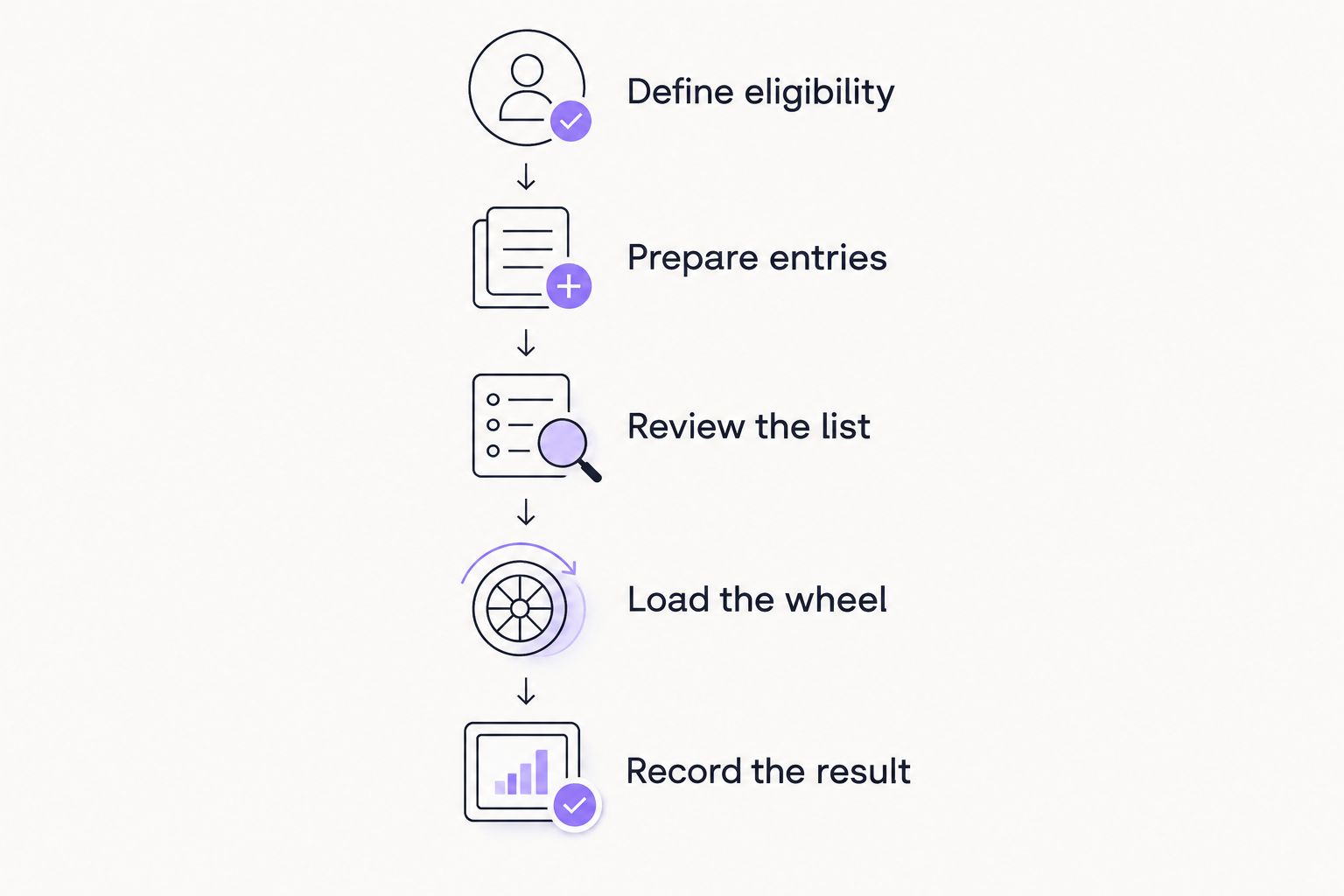
Use this sequence for a documented 2026 draw:
- Define eligibility. State whether entry depends on registration, check-in, or another published condition.
- Prepare entries. Extract or transcribe only the eligible records, using the ticketing platform's supported methods.
- Review the list. Check duplicates, canceled records, and the number of entries each person receives.
- Load the wheel. Enter the approved labels and compare them with your source list.
- Record the result. Save the selected label and verify it against the original eligible record.
For example, suppose a school event has 60 eligible attendees and permits 1 entry per attendee. Prepare 60 entries. If someone bought 2 tickets but your rules allow only 1 entry per person, that attendee still receives 1 entry.
Those figures describe an example policy, not a software limit. The point is to decide what an entry represents before transferring names.
Keep a copy of the approved list separate from the live wheel. If someone questions a result, you need to identify which records were eligible at the draw deadline, not reconstruct them from memory.
Automated connections: verify both ends
An automated connection requires a supported way to retrieve ticket information and a supported way to update the wheel. If you also need winners written back to event records, verify that return path separately.
Do not assume that an available ticketing API proves compatibility with a particular wheel. Both ends must support the operation you need. A connection that reads registrations is not necessarily a connection that can create entries or retrieve a result.
Ask for documentation covering the actual workflow:
- Which ticket events trigger an update, such as registration, cancellation, or check-in?
- Which fields identify an entrant without confusing people who share a name?
- How does the connection prevent repeated updates from creating duplicate entries?
- What happens when a transfer fails?
- How is a selected entry matched back to the ticket record?
- Where is the draw result recorded?
Approve the workflow only after a test demonstrates the required behavior. A successful page load is not a successful integration test.
Automation removes repeated manual transfers when it works as intended. It also introduces a dependency on permissions, field mapping, and failure handling. Keep a fallback procedure that tells the organizer whether to pause the draw or use a reviewed list.
Why integration requirements vary
The right setup depends on the event's rules and the actions the software must perform. For your 2026 requirements, write down these factors before comparing tools:
- Entry timing. A closed list supports a different workflow from registrations that remain open during the draw.
- Eligibility source. Registered ticket holders and checked-in attendees are different groups.
- Entry allocation. One entry per person differs from one entry per eligible ticket.
- Winner handling. Selecting once differs from running several draws without repeat winners.
- Data exposure. Public display labels need not include every field in a ticket record.
- Record keeping. Announcing a winner differs from updating an event record and preserving a draw history.
For a classroom activity, a prepared list of group names can be enough. For an event giveaway, you also need a way to connect each displayed entry to an eligible participant. Do not add automation merely because the wheel appears on a ticketing page.
How should you test a ticketing-to-wheel workflow?
Test the entire route from eligibility to the recorded result. Use clearly labeled test records rather than real attendee details while you establish the process.
Start with an ordinary eligible registration. Then test the exceptions your rules must handle: a duplicate name, a canceled registration, a late entry, and a previous winner. Confirm what happens before, during, and after selection.
| Test case | Expected behavior to define | Failure to prevent |
|---|---|---|
| Eligible registration | Appears with the correct entry allocation | An eligible attendee is omitted |
| Duplicate name | Remains distinguishable by an appropriate identifier | The wrong person receives the result |
| Canceled registration | Follows the published eligibility rule | An ineligible record remains in the draw |
| Late registration | Follows the stated entry deadline | The entry pool changes without explanation |
| Previous winner | Follows the repeat-winner rule | An excluded winner remains eligible |
Record the expected behavior before testing. Otherwise, an unexpected result can be mistaken for an acceptable software feature.
Use a final rehearsal on the device and display planned for the event. Confirm that the organizer can read the result and match it to the correct record without showing unnecessary attendee information.
Can I prevent the same ticket holder from winning twice?
Yes, if your workflow removes or excludes previous winners before the next draw. That can be a manual list change or a documented software function; verify which method your chosen setup supports.
Decide whether exclusion applies to the person, the ticket, or the displayed entry. Those rules produce different outcomes when someone holds several tickets. Explain the rule before drawing, then apply it consistently.
Does embedding a wheel verify that someone bought a ticket?
No. An embed displays the wheel; ticket verification requires a separate eligibility check or a supported data connection.
If attendees can access an event page without purchasing, page access alone cannot establish purchase eligibility. Match the selected entry to the qualifying ticket record before confirming the award.
Keep attendee data out of the public display
Transfer only the information needed to run the activity. A wheel used on a projector does not need to display email addresses, payment details, or full ticket records.
Choose a display label that lets the organizer identify the selected entrant through a separate reference list. Avoid ambiguous labels when several attendees share a name. Also avoid publishing ticket credentials that could be used for entry or account access.
Spinthewheelapp's random picker wheel is useful for the selection step; keep ticket verification and attendee records in a separate, documented process unless a supported connection explicitly handles them. For a 2026 school event, consider whether group labels or assigned draw identifiers will meet the activity's needs without displaying student names.
FAQ
Can spin the wheel integrate with event ticketing software automatically?
Yes, when both systems provide compatible, documented ways to exchange the required data. Verify entrant updates, duplicate handling, and result recording separately before using the connection for a live draw.
Does Spinthewheelapp automatically import my ticket buyers?
Do not assume automatic ticket-buyer imports for Spinthewheelapp. Confirm a documented connection for your ticketing platform, or prepare and review the entrant list separately.
Is an embedded wheel the same as a ticketing integration?
No. An embedded wheel appears within a page, while a ticketing integration exchanges or acts on ticket data. A display embed alone does not verify eligibility.
Should I use attendee names or ticket numbers on the wheel?
Use labels that identify the selected entrant without exposing unnecessary personal information or ticket credentials. Keep a separate reference that connects each display label to the eligible record.
Can one person receive several entries in an event draw?
Yes, if the published entry rules allow several entries per person. Decide whether entries follow people or eligible tickets before preparing the list, and apply the same rule throughout the draw.
What happens if someone cancels after I prepare the wheel?
Apply the published eligibility rule and update the entrant list before drawing when that rule excludes canceled registrations. A manually prepared list does not update itself when ticket records change.
Can I use a wheel for a school event without connecting ticketing software?
Yes. Prepare a reviewed list of eligible participants or activity choices and use the wheel for selection. Keep attendance checks and any winner records outside the wheel unless documented features handle them.
One last thing
Freeze the eligible entry list before the live draw. State the cutoff, review the list, and keep that version as the reference for the result. If registrations remain open, explain whether later registrations enter a later draw instead.
A wheel animation cannot correct an eligibility mistake. The most useful preparation is a clear rule for who enters, how many entries they receive, and what happens after selection.


