

To make a spin the wheel not repeat winners, remove each selected person from the active list before the next spin, including any duplicate entries or alternate names for that person. Use an automatic removal setting if your wheel provides one; otherwise, edit the list manually and keep a separate winner log so a reset does not put previous winners back into the draw.
- How to make a spin the wheel not repeat winners: remove every entry belonging to each selected person.
- Spinthewheelapp is a free random picker wheel; check removal controls before running a no-repeat draw.
- For classroom turns, keep selected students out until everyone eligible has participated.
- For giveaways, distinguish one winning entry from one winning person before the first spin.
Why this matters
A random selection can repeat when the previous winner stays eligible. A different animation, longer spin, or changed color does not remove that person from the list. Your no-repeat rule depends on the entries available for the next draw.
You can use the free Spinthewheelapp random picker wheel for names, prizes, numbers, food choices, and other editable options. For a no-repeat activity, the important step is checking the active list between spins, not assuming that the wheel remembers who already won.
For your 2026 classroom activities, choose the boundary first: no repeats within a lesson, within a group activity, or until everyone has had a turn. A rule that ends after one lesson is different from a rule that carries into the next class.
How do you make a spin the wheel not repeat winners?
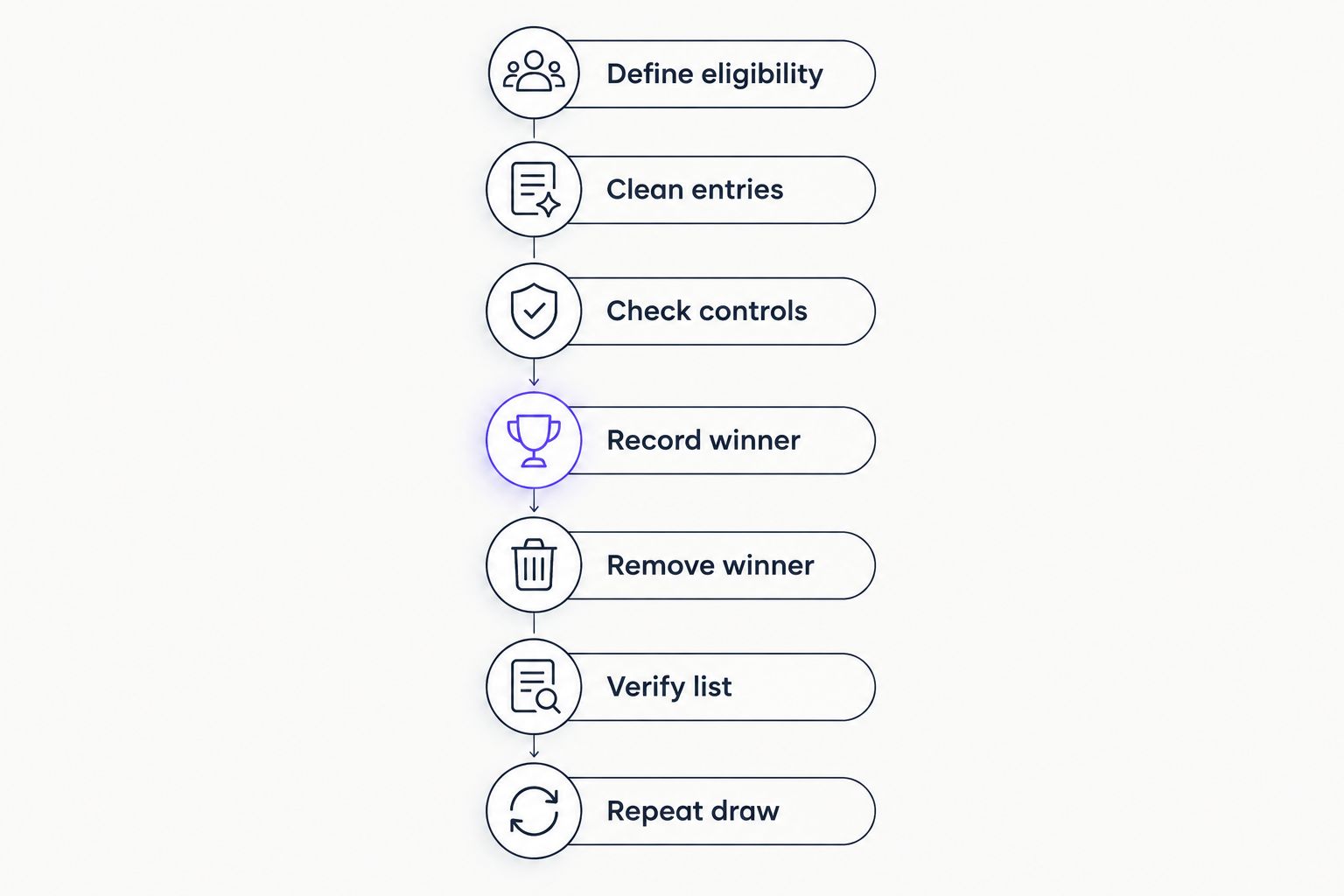
Follow this sequence whenever you need different people to win or take turns. It works as a manual process without depending on a particular button name or an undocumented setting.
1. Define eligibility
Decide what the wheel is selecting: a person, a ticket, a team, or a prize. Write the no-repeat rule in terms of that unit. If each person can win only once, removing a single ticket is not enough when that person owns other tickets.
For classroom participation, a useful rule is: each eligible student gets one turn before anyone gets another. For a giveaway, state whether a winner leaves the entire event or only the current prize round. Set that rule before revealing a result.
2. Clean entries
Check the starting list for duplicate names, spelling variations, nicknames, and copied entries. Use a consistent identifier for each participant. Two different people with the same name need distinct labels, while two labels for the same person need to be recognized as one participant.
Keep a master list outside the wheel. The master list preserves your starting roster; the active list changes as people are selected. Do not use the master list as the live draw list after winners have been removed.
3. Check controls
Look for an option that removes or excludes a selected entry after a spin. Enable it if available, then test the behavior with sample entries before loading your real participants. Button wording differs between tools, so verify the outcome rather than relying on a label.
Check whether the control removes only the selected entry or every matching entry. If the tool does not provide removal, use the editable list. A manual process is suitable when you can pause after each result and inspect the remaining entries.
4. Record winner
Spin once and record the selected participant before editing anything. Your log should identify the person and the round or activity. For a prize draw, record the awarded prize too, so the participant list and prize list do not get confused.
A separate log gives you something to compare against the next active list. It also helps when an interruption leaves you unsure whether a result was accepted. Decide how you handle invalid or declined results before the draw begins.
5. Remove winner
Remove every entry belonging to the selected person when your rule is one win per person. Search for alternate labels as well as exact duplicates. If your rule is one selection per ticket, remove the selected ticket instead and explain that the ticket holder can still win through another eligible ticket.
Do not replace a removed name with a blank entry. Delete the entry from the active options. An empty option is not another participant and should not become a possible outcome.
6. Verify list
Check that the winner no longer appears among the eligible options. Compare the edited list with your winner log, particularly after a refresh, a new session, or a restored list. Do not assume an edit survives those actions without testing it.
If the same person appears again, stop before the next spin. Correct the list and apply your announced rule for handling the affected result. Quietly spinning again without explaining the correction leaves participants unable to follow the process.
7. Repeat draw
Run the next spin only after the list check. Continue until you have the required winners or everyone eligible has had a turn. If no eligible entries remain, stop rather than restoring previous winners just to keep the wheel moving.
At the end, keep the winner log and clear the active list for the next activity. Restore the master roster only when a new cycle begins under your stated rules.
Manual removal: inspect the list after every result
Best for: classroom turns and draws where you can pause between selections. Manual removal lets you decide exactly which entries leave the wheel. It also makes the eligibility change visible when you show participants the edited list.
The drawback is the extra handling. You must record the result, edit the options, and check for other entries belonging to the same person. Skipping the check creates an opportunity for a previous winner to remain eligible.
Use a simple verbal routine: announce the result, record the name, remove the participant, and confirm the remaining list. For a 2026 substitute-teacher activity, leave that routine with the roster and explain when the class starts a fresh participation cycle.
Automatic removal: test what the setting actually excludes
Best for: repeated draws when the chosen tool has a verified removal setting. Automatic removal reduces the need to edit after each result. It does not replace the starting-list check or your separate winner log.
The limitation is scope. A setting that removes one selected entry does not necessarily remove other entries belonging to the same person. Test the behavior before using it for a one-win-per-person giveaway.
| Method | Best for | Advantage | Limitation | Check before the next spin |
|---|---|---|---|---|
| Manual removal | Classroom turns and controlled draws | You choose exactly which entries to delete | Requires attention after every result | The winner and alternate entries are absent |
| Automatic removal, if available | Repeated draws with tested controls | Reduces manual editing | Can operate at entry level rather than person level | The selected person is no longer eligible |
Neither method proves perfect randomness. Both address whether a previous winner remains in the pool. Treat eligibility controls and the wheel's selection method as separate questions.
Why no-repeat behavior varies
The same no-repeat instruction produces different results when the underlying rules differ. Check these factors before your 2026 raffle, classroom rotation, or live giveaway:
- Selection unit. A person, ticket, team, and prize are different units. Removing one unit does not automatically remove related units.
- Duplicate entries. A participant listed under multiple labels stays eligible if only one label is deleted.
- Removal scope. An available control needs to match the rule you announced: one entry removed or the participant excluded entirely.
- Cycle boundary. A new lesson or prize round can restore eligibility only if that is part of your stated process.
- List restoration. Reloading a saved roster or copying the original entries can reintroduce winners. Check the active options afterward.
- Multiple operators. When more than one person runs draws, everyone needs the same current list and winner log.
Write the rule as an observable action. Instead of saying the wheel should be fair, say that every selected student's entry is removed until the class completes the participation cycle. Participants can check that action directly.
How do you prevent repeated students in a classroom activity?
Use one entry per eligible student and remove each selected student until the activity cycle ends. Keep the process separate from rewards or assessment: selection determines whose turn comes next, not the quality of a student's work.
For an illustrative activity with 6 students and 3 speaking turns, remove a student after each accepted turn. After the third selection, 3 students remain eligible in that cycle. Keep those remaining students on the active list if the activity continues later.
If attendance changes, update eligibility before the next draw. An absent student should not remain in a wheel intended to select someone who can participate immediately. Apply the same announced participation rule when that student returns.
Spinthewheelapp is a free random picker wheel for teachers who need editable names for classroom selections. For no-repeat use, make list removal part of your classroom instructions rather than relying on an unverified automatic feature.
Can someone with multiple raffle entries still win twice?
Yes, a person can remain eligible if you remove only the winning entry and leave their other entries on the wheel. If your rule allows one prize per person, remove all entries linked to the winner before drawing again.
For a documented 2026 giveaway workflow, distinguish intentional extra entries from accidental duplicates. Extra eligible entries can be part of the published rules; accidental copies should not silently change a person's representation in the draw.
Use a participant identifier to connect entries to people. A ticket label alone is not enough if you cannot tell which other tickets belong to the winner. Prepare that mapping before the event, not while the audience waits for the next prize.
Do not change the rule after someone wins. If repeat wins are allowed, say so before the first draw. If they are prohibited, make participant-level removal part of every accepted result.
When should you reset the wheel and allow repeats again?
Reset only when the announced no-repeat cycle ends. For classroom participation, that can mean everyone eligible has taken a turn. For a giveaway, it means the boundary stated in the event rules, not an arbitrary refresh or a change of prize.
Keep the reset deliberate. Confirm the completed cycle, restore the intended roster, and check the entries before spinning. A saved list is a starting point, not proof that the right participants are eligible for the new activity.
FAQ
How do I make a spin the wheel not repeat winners?
Remove every entry belonging to each winner before the next spin. Use a tested automatic removal setting if available, or edit the list manually and check it against a separate winner log.
Does a random wheel automatically stop the same person from winning twice?
No, random selection alone does not exclude a previous winner. The person must leave the eligible pool, either through a verified removal control or manual editing.
What should I do if the same winner appears again?
Pause the draw and check the active list for that person's remaining entries. Correct the eligibility list and handle the repeated result according to the rule announced before the draw.
Can I use Spinthewheelapp for a classroom name picker?
Spinthewheelapp is a free customizable random picker wheel that supports names. For a no-repeat classroom activity, check the removal controls and manually remove selected students if needed.
Should I remove duplicate names before spinning?
Remove accidental duplicate entries before spinning, and use distinct labels for different people who share a name. For intentional multiple-entry raffles, keep a mapping from each entry to its participant.
Can I stop repeats without an automatic remove-winner button?
Yes, you can stop repeats by deleting the winner's entries from the editable list before every subsequent spin. Keep a winner log so you can detect accidental restoration of selected participants.
Does changing the spin speed prevent repeat winners?
Changing spin speed is not an eligibility rule. Remove the previous winner from the active entries instead of using animation settings to manage repeat selections.
When can students go back on the wheel?
Students go back on the wheel when your announced participation cycle ends. For a turn-taking activity, restore the roster after everyone eligible has had a turn, then check attendance before starting again.
One last thing
Check the list after restoring it, not just after removing a winner. A carefully edited draw can lose its no-repeat protection when someone pastes the original roster back into the wheel. The visible list is the eligibility list for that next spin.
For your next 2026 activity, prepare two separate documents: the original roster and the accepted-winner log. Before resuming an interrupted draw, remove logged winners from the active roster again. That check is more useful than asking whether the wheel remembers the previous session.


