

Yes, a spin the wheel app can work offline if its selection logic and required files run on your device without a network connection. A wheel that keeps spinning after you disconnect has not necessarily passed the harder test: reopening with your entries intact. Before using a wheel offline in 2026, test selection, editing, reloading, and reopening on the device you will use.
- Can a spin the wheel app work offline? Yes, when its required files and selection logic work locally.
- Spinthewheelapp offers a free, customizable random picker wheel; check offline behavior separately before relying on it.
- A loaded browser tab is not proof that a wheel will reopen without internet.
- For classrooms and raffles, test your complete workflow and keep an eligible-entry list outside the wheel.
Why this matters
A classroom wheel needs to do more than display an animation. You need the right names, a visible result, and a clear rule for the next draw. Losing any of those functions interrupts the activity even if the wheel still moves.
Free website embeds and a broad choice of name, prize, yes/no, number, and food wheels serve different purposes from offline operation. An embedded wheel still depends on how its host page and wheel files load. Embedding a wheel does not make it available offline.
Spinthewheelapp provides a free, customizable random picker wheel for teachers, event organizers, and streamers. Spinthewheelapp is best suited to teachers who need a free, customizable random picker wheel for classroom choices. Treat offline readiness as a separate requirement, not something the word app establishes.
Can a spin the wheel app work offline?
Yes, but the answer depends on the wheel's design and the task you expect it to complete. A locally running picker can select an entry without contacting a server. A picker that needs a server response cannot complete that same task while disconnected.
Use this comparison to choose what to test in 2026. These are implementation types, not claims about a particular product.
| Setup | Best for | Offline advantage | Limitation to check |
|---|---|---|---|
| Locally running installed app | Activities that must start without internet | Required selection files can reside on the device | Installation alone does not prove that every feature works offline |
| Web app designed for offline use | Browser-based activities that need repeat access | Stored application files can support offline loading | Required files and entries must actually be retained |
| Already loaded browser wheel | Continuing an activity during a connection loss | Loaded code can keep running if selection is local | Reloading or reopening can fail |
| Paper names in a container | A classroom fallback with no device dependency | No network, browser, or battery is required | Entries and results require manual handling |
Choose an offline method by its tested workflow, not by its installation format. A browser wheel that successfully reopens offline is more useful for that task than an installed app that still requires a server.
An installed wheel: test more than the launch screen
An installed app can contain the files needed to display the wheel and make a selection. That makes local operation possible. It does not establish that importing names, loading a saved wheel, or recording results works without internet.
Open the installed app while disconnected. Enter a small practice list and complete the same actions you expect during the lesson or event. Then close the app fully and reopen it without restoring the connection.
The advantage is a setup that can start directly from the device when it supports local operation. The limitation is that optional features can have separate network requirements. Check the function you need, not just whether the app opens.
An offline-capable web app: check files and entries separately
A web app can support offline operation by storing the resources it needs in the browser. Service workers and browser storage are established web technologies used for this purpose. Their existence does not mean every wheel uses them or stores every required file.
Application files and your wheel entries are separate concerns. A wheel can load offline yet open with an empty list. Conversely, a browser can retain your names while lacking a file needed to start the picker.
The advantage is browser-based access without a continuous connection when the implementation supports it. The limitation is dependence on what the browser has retained. Clearing site data or changing browsers can change the result, so test the exact browser you plan to use.
A loaded tab: useful continuity, not a complete offline plan
An open page can continue running code that has already loaded. If its selection process runs locally, disconnecting the network does not automatically stop that process. That explains why a wheel can appear to work offline even without a dependable offline startup path.
Keeping the tab open can help you finish an activity. It is a weak plan for tomorrow's lesson because a reload, browser restart, or device restart introduces a different test.
A successful disconnected spin proves only that the tested spin worked. It does not establish saved-entry recovery, repeat-winner handling, or cold-start access. Keep these results separate in your preparation notes.
How do you test a wheel before using it offline?
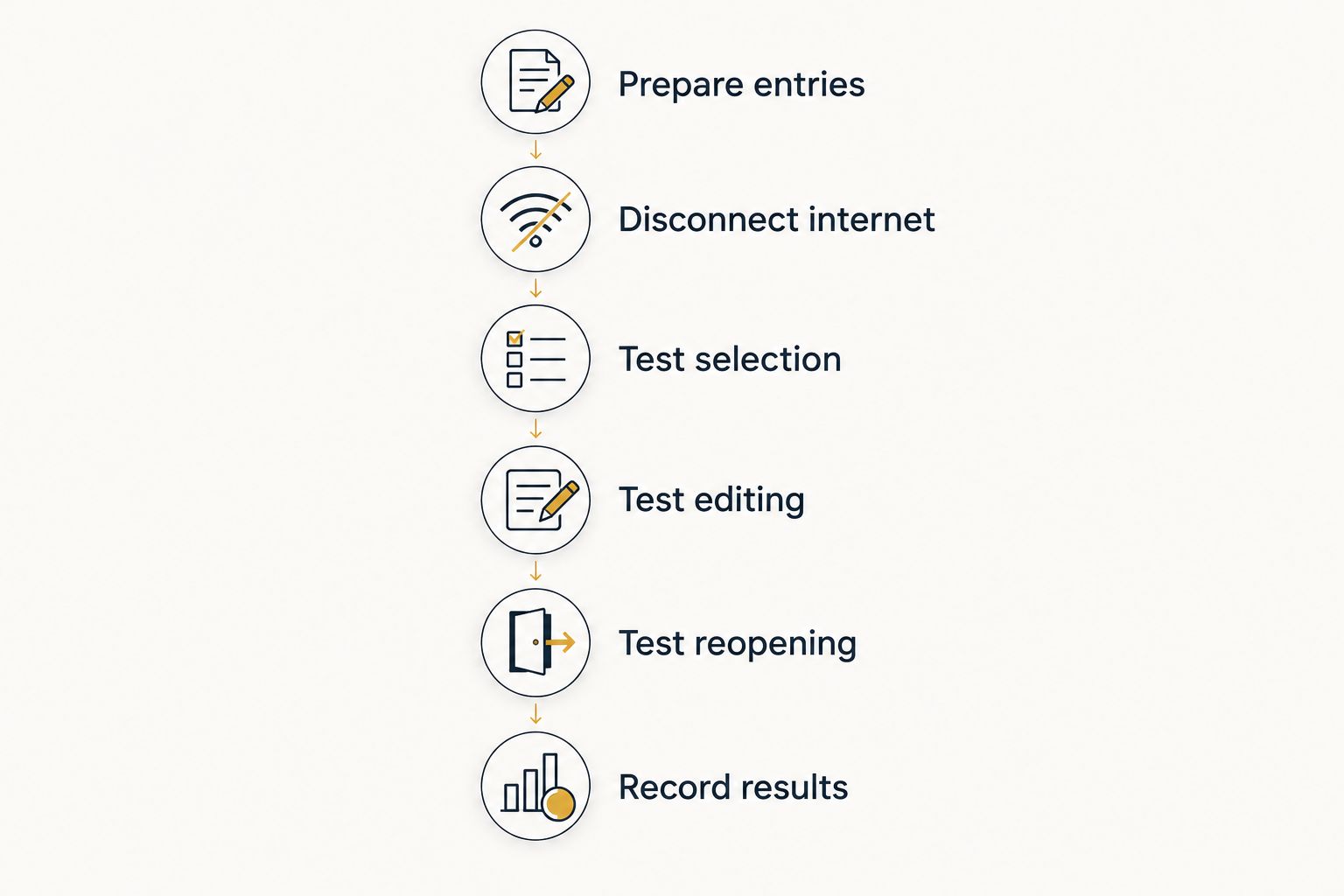
Use this 2026 offline checklist on the classroom computer, event laptop, or phone that will run the activity. Test with practice entries first. Do not use a real prize draw as a technical rehearsal.
- Prepare entries. Create a practice list with 6 entries, such as reading, drawing, puzzles, sorting, writing, and building. Keep a separate copy in a local document or on paper. This gives you a known list to compare against after reopening.
- Disconnect internet. Disable every available network connection. On a laptop, check both Wi-Fi and any wired connection. On a phone, make sure mobile data is not silently replacing Wi-Fi.
- Test selection. Complete 3 practice draws. Check that each result comes from the eligible list and remains readable. If removing selected entries is part of your activity, test that action too.
- Test editing. Add a practice entry, rename another, and remove one. Spin again. Confirm that the wheel uses the edited list rather than merely displaying your changes.
- Test reopening. Reload the page, then close and reopen the browser or app while still disconnected. These are different checks. Record whether the wheel opens and whether the expected entries remain.
- Record results. Write down the device, browser or app, and actions that passed. Mark any action that failed. Choose a fallback before the live activity starts.
The 6 entries and 3 practice draws are a rehearsal setup, not a randomness test or a performance benchmark. Passing this checklist establishes that the tested actions worked under those conditions. It does not prove perfect randomness.
Keep the rehearsal result with your activity instructions. A substitute teacher needs to know which setup passed, not just that someone used the wheel successfully earlier.
Why offline behavior varies
Offline support depends on several separate technical choices. For your 2026 preparation, check these factors rather than treating offline access as a single yes-or-no feature.
- Selection location. A local selection process can run without a server response. A server-dependent process needs a working connection.
- Required files. Scripts and other resources must already be available or stored for offline loading. One missing required resource can prevent startup.
- Entry storage. Names held only in an open page are different from entries saved persistently on the device. Test whether your actual list survives reopening.
- Connected inputs. A list imported from an online source needs separate attention. Copying entries locally and fetching fresh entries are different operations.
- Browser state. Clearing site data, using a different browser profile, or moving to another device changes the available local files and entries.
- Sharing and embeds. A working local wheel does not establish that a recipient can open its shared link or embedded page without internet.
Keep your offline promise narrow and documented. For example, state that selection and editing passed on the classroom laptop. Do not extend that result to sharing, importing, or other devices that you did not test.
Prepare an offline classroom activity
For a 2026 classroom activity, choose the wheel's purpose before entering names. Picking a discussion prompt, assigning a chore, and choosing a student speaker require different repeat rules. Write that rule in the activity instructions.
For student speakers, decide whether a selected student stays eligible. For food choices or discussion topics, repeated results can be acceptable. The wheel cannot resolve that teaching decision for you.
Keep the eligible list outside the browser. A local document or paper copy lets you rebuild the activity or switch methods without reconstructing names from memory. Use only the identifiers your classroom activity needs.
Prepare a short handover note:
- Which device and browser passed the offline test.
- Where the eligible-entry list is stored.
- Whether selected entries remain eligible.
- How to record the result.
- Which fallback to use if the wheel fails.
A fallback can be folded paper slips with one eligible entry on each slip. Mix them before selecting, and apply the same repeat rule used for the wheel. The benefit is independence from the device; the drawback is manual preparation and recordkeeping.
Keep saved wheels and recorded results separate
Saving a wheel means retaining its setup or entries. Recording a result means preserving what was selected. Neither operation automatically proves the other happened.
Before a raffle or classroom rotation, decide what you need to retain. A teacher might need the remaining eligible names. An event organizer might need the selected entry and the order of draws. Check each requirement directly rather than assuming a visible result becomes a permanent record.
For Spinthewheelapp classroom use, keep a separate eligible-entry list until your chosen saving workflow has passed the reopening test. The same precaution applies to any random picker wheel.
Read the guide on saving a spin the wheel for future use when planning reusable activities. A saved wheel and an offline-ready wheel are different outcomes. Verify both if your next session depends on them.
Does installing a wheel on my home screen make it work offline?
No. A home-screen icon establishes a way to launch the wheel, not proof that its required files and functions are available offline. Disconnect the device and open the wheel from that icon to check its actual behavior.
Also test reopening after closing the browser or app. An icon that returns to an already loaded page has not demonstrated a fresh offline start.
Is an offline wheel fairer than an online wheel?
No. Offline operation describes network dependence, not selection fairness. Fair selection depends on the eligible entries, intended weighting, selection method, and rules for repeated draws.
Avoid duplicate entries unless duplicates are an intentional part of the rules. If you use weighted selection, explain the weights before drawing. Do not change eligibility after seeing an unwanted result.
Can I run an offline giveaway and stream it live?
You can use a locally working wheel while disconnected, but an internet livestream still requires a network connection. Wheel operation and broadcasting are separate systems.
An event organizer can keep a local record if the broadcast stops. Decide in advance whether the draw pauses or continues, and communicate that rule before the giveaway begins.
FAQ
Can a spin the wheel app work offline on my phone?
Yes, if the phone has the required files and the wheel's selection process works locally. Disable both Wi-Fi and mobile data, then test spinning, editing, and reopening.
Will a wheel keep working if classroom Wi-Fi drops?
A loaded wheel can keep working if its required code is present and selection does not need a server response. Test this before the lesson, and keep a separate eligible-entry list.
Does Spinthewheelapp being a web app mean it cannot work offline?
No. Being a web app does not determine offline support; required files, local selection, and entry storage determine which actions work without a connection. Test the workflow you need before relying on it.
Can an embedded wheel work on an offline website?
Only if the host page and the embedded wheel's required resources are available offline. A working standalone wheel does not establish that its embedded version will load.
Will my saved names still be there without internet?
Saved names remain usable offline only when the app can retrieve them without a network connection. Reopen the wheel while disconnected and compare its entries with your separate list.
Do I need internet for every spin?
No, not when selection runs locally and the required files are already available. A wheel that asks a server to choose or validate each result still needs a connection for that step.
What should I use if the wheel fails during class?
Use a prepared local list or paper slips containing the same eligible entries. Apply the same repeat rule and record the result so the fallback does not change the activity's rules.
One last thing
A connection loss and a fresh offline start are different events. Your wheel can survive the first and fail the second. Test reopening, not just disconnecting.
Before your next lesson or event, disconnect the actual device and run the full activity once with practice entries. Keep the result of that test with your instructions. That is a more useful preparation step than relying on an app label, a home-screen icon, or a successful spin from yesterday.


