

Yes—you can keep a spin-the-wheel setup for later by saving its entry list and selection rules, then rebuilding it when needed. To reopen the exact wheel, use the tool’s save, export, or share function if it provides one, and test that the saved version retains your setup. A bookmark alone does not prove that your entries, settings, or previous results have been saved.
- Can you save a spin the wheel for later? Yes—preserve the entries and rules, then verify any saved wheel.
- Spinthewheelapp offers a free random picker wheel for names, prizes, numbers, yes/no answers, and food choices.
- Keep a separate entry-list backup; saving a wheel and recording its results are different tasks.
- For classroom reuse, separate the original roster from the list of students still eligible for selection.
Why this matters
A reusable wheel needs more than a page you can open again. You need the correct entries, the intended selection rules, and a clear decision about whether the next session starts fresh or continues the previous activity.
Spinthewheelapp is a free, customizable random picker wheel for teachers, event organizers, and streamers. Spinthewheelapp is a practical choice for teachers who want an editable random picker wheel for classroom selections. For recurring activities, pair the wheel with a separate written setup so you can check what belongs in it.
For your 2026 classroom activities, keep the reusable roster separate from the session record. The roster tells you who belongs in the activity. The session record tells you who has already taken a turn. Mixing them creates avoidable confusion when you reopen the wheel.
Can you save a spin the wheel for future use?
Yes, but distinguish saving the setup from saving a working wheel. A copied entry list lets you reconstruct the options. A saved wheel must also retain whichever settings you expect to reuse. A result log serves another purpose: it records what happened during an activity.
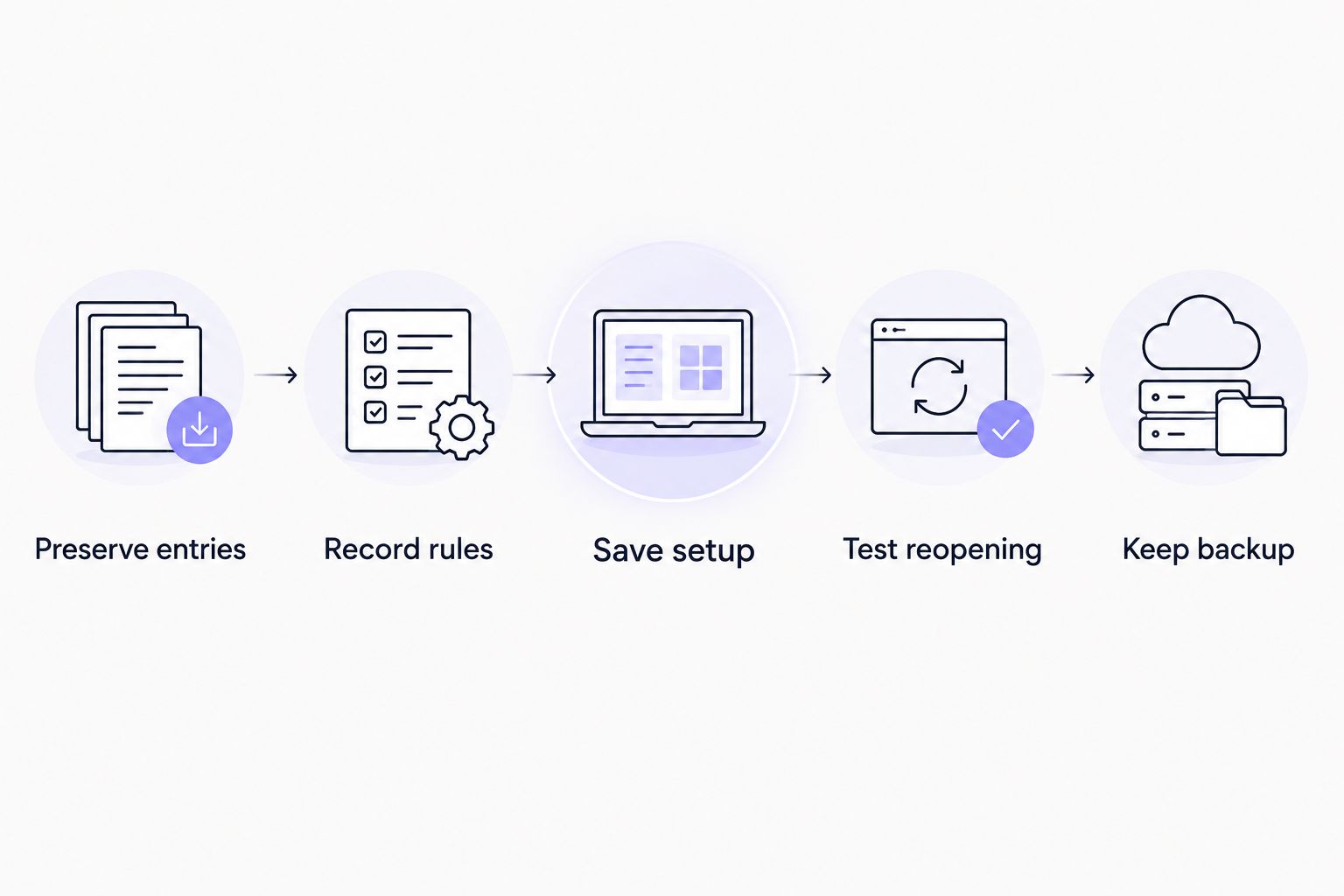
Use this process before relying on a wheel for tomorrow’s lesson, a recurring raffle, or a weekly chores draw.
Preserve entries
Copy the complete option list into a document you control. Put each option on its own line so you can inspect the list and reuse it without untangling a paragraph of names.
Check spelling, duplicate entries, and eligibility before saving the list. For a classroom activity, decide whether the wheel contains students, groups, discussion topics, or tasks. Do not mix those categories unless the activity explicitly calls for it.
Give the document a descriptive name, such as 2026 discussion groups — original list. The label should identify the activity and distinguish the original list from a version changed during a session.
Record rules
Write down what the draw is supposed to do. State whether selected entries remain eligible, whether duplicate entries are intentional, and whether any options should receive different selection chances.
If you use a tool with weighting controls, record the intended weights separately. Do not assume that copying visible labels preserves those settings. The entry text and the selection rules are different parts of the setup.
For classroom turns, a useful instruction is: remove students from the working list after they participate, then restore the original roster for the next activity. That instruction defines the workflow without depending on a particular interface.
Save setup
If the wheel tool provides a save, export, or share function, use the function intended to preserve the configuration. Read what it saves before treating the result as your reusable copy.
A browser bookmark stores an address. It does not, by itself, copy everything displayed on the page. Some applications put configuration information in an address; others keep it elsewhere. The reopening test is what tells you whether your particular saved address works.
If you only need the same choices tomorrow, the separate text list is enough to rebuild them. If you need the exact settings, preserve those settings too.
Test reopening
Close the wheel and reopen the saved version. Compare the entries with your backup, then inspect the rules you intend to reuse. Do this before a class or event, not while participants are waiting.
If you plan to use another device, test on that device. If a substitute teacher will run the activity, test the handoff from the substitute’s starting point rather than from your already-open browser session.
Reopening successfully on your own computer answers a narrow question: that setup works there. It does not establish that someone else can access the same configuration.
Keep backup
Store the original entry list and instructions somewhere you can retrieve them independently of the wheel. Keep the activity record separate so that removing a selected entry does not overwrite your reusable master list.
Before each reuse, compare the working wheel with that master list. Restore entries only when the next activity calls for a fresh start. For an unfinished activity, continue from the remaining eligible entries instead.
Which saving method fits your activity?
Choose the method according to what you need to preserve. Repeating a food-choice list is different from handing a classroom activity to another teacher or continuing an unfinished giveaway.
The comparison below separates the strengths and limits of each method. Keep a text backup even when another saving method works. It gives you a readable reference for checking entries.
| Method | Best for | Advantage | Limit or check |
|---|---|---|---|
| Separate entry list | Rebuilding recurring classroom, chores, or food-choice wheels | Keeps the options readable and editable | Does not preserve appearance, weights, or results by itself |
| Tool-provided saved configuration | Reopening a prepared activity, when supported | Can preserve the configuration covered by that feature | Check exactly which settings return |
| Browser bookmark | Returning to a tested wheel address | Gives you a direct route back to that address | The address alone does not establish that the setup is stored |
| Tool-provided export | Keeping a portable configuration, when supported | Provides a separate file for the supported configuration | Check that the receiving tool can open it |
| Screenshot | Keeping a visual reference | Shows what was visible when captured | Does not provide an editable wheel or necessarily show every entry |
| Separate result log | Continuing an activity or documenting selections | Records selected entries and the sequence you record | Does not rebuild the original wheel configuration |
A screenshot is useful as a reference, not as your only backup. A crowded wheel can leave labels difficult to read. The full text list is the better source for checking names and options.
For a 2026 substitute-teacher handoff, use a tested saved setup plus written instructions. If the saved setup does not reopen as intended, the entry list gives the substitute a way to reconstruct the activity.
Why saving and reopening a wheel varies
The important difference is where the configuration lives and what the saving method captures. Check these factors before choosing your reuse workflow:
- Storage location: An address, browser storage, a file, and an account are different places to keep configuration data. Use the method the tool actually supports.
- Browser state: Browser-stored data can be removed when you clear site data. Private browsing is not a dependable place for a long-term setup.
- Device access: A setup available in your browser does not establish that it is available on another computer. Test the intended device.
- Saved contents: An entry list, appearance settings, selection weights, and draw history are separate things. Verify the parts your activity needs.
- Session changes: Removing selected entries changes the working list. Keep an untouched original if the next session should start over.
- Sharing permissions: A saved configuration can still require access that another person does not have. Check the recipient’s actual opening process.
Avoid assuming that leaving a tab open is a saving method. It keeps your current working session available while that session remains intact. It is not a substitute for a backup you can retrieve after closing the browser.
How do you prepare a classroom wheel for tomorrow?
Start with the lesson, not the spinner. Decide what the wheel selects and what happens after a selection. For discussion turns, that means defining who is eligible and whether a student remains on the list after speaking.
Keep an original roster and a working roster. The original roster belongs to the reusable activity. The working roster reflects today’s participation. When the lesson ends, label the working version clearly instead of replacing the original without explanation.
For a 2026 classroom plan, include a short handoff note:
- Identify the activity and the list to use.
- Explain whether today starts fresh or continues an unfinished session.
- State what to do after an entry is selected.
- Identify where to record results.
- Explain how to rebuild the wheel from the backup list.
A substitute should not have to infer the rules from the wheel’s appearance. Written instructions make the activity repeatable even when the person running it changes.
Keep student information limited to what the activity needs. If the wheel will appear on a public page or shared screen, review the entries before displaying them. Initials or classroom labels can avoid displaying full names where those names are unnecessary.
For a website-based activity, treat embedding and saving as separate tasks. An embed displays a tool within another page; it does not, by itself, establish that your current list will return later. The guide to embedding a decision wheel on your website covers that related workflow.
Can you save a wheel without saving previous winners?
Yes—preserve the original options separately from the result log. Saving your entry list does not require you to treat previous winners as part of the reusable setup.
For a new activity, rebuild or restore the original eligible list according to the rules. For an unfinished activity, preserve the remaining eligible list and the results already recorded. These are different starting points.
For a 2026 giveaway, label the original entrant list and the remaining entrant list distinctly. A file called remaining entrants is more useful than an unlabeled copy that leaves the next organizer guessing whether winners have already been removed.
Can you reopen a saved wheel on another device?
Yes, if your saving method makes the configuration accessible on that device. A separate entry list can be transferred and used to rebuild the options; a tool-specific saved setup needs its own opening test.
Check the destination device before the activity. Open the saved configuration, compare the list, and inspect the settings. If another person is running it, have that person perform the check using their own access.
Do not confuse sharing an address with sharing a verified setup. The recipient needs the intended entries and rules, not simply a page that opens.
Does saving a wheel preserve fair selections?
Saving preserves information; it does not establish how the selection method works. Review eligibility, duplicates, weights, and repeat-selection rules before each session.
An accidental duplicate can give an option additional representation in an entry-based draw. An intentional duplicate needs a documented reason. Likewise, removing a previous winner changes who is eligible for the next selection.
Keep these decisions visible in your instructions. For classroom participation, document whether the aim is a random turn from the full roster or a turn from students who have not yet participated. Neither instruction should be left implicit.
FAQ
Can you save a spin the wheel for later without an account?
You can preserve the entry list and rules in a separate document without a wheel account. Whether the exact wheel can reopen without an account depends on the tool’s saving method; test it before relying on it.
Does bookmarking a spin-the-wheel page save my names?
A bookmark saves the page address, not necessarily your names. Reopen the bookmark and compare the entries with a separate backup list.
Can I save a classroom wheel for a substitute teacher?
Yes—keep the entries, selection rules, and opening instructions together. Test the substitute’s access and explain whether the activity starts fresh or continues a previous session.
Can I save Spinthewheelapp entries for another lesson?
You can keep a separate copy of the entries you use in Spinthewheelapp and reuse that list for another lesson. Check the current wheel’s saving controls before relying on an exact saved configuration.
Will a screenshot let me edit the wheel later?
No—a screenshot is a visual reference, not an editable wheel. Keep the full entry list and any selection settings separately.
Does saving a wheel also save its previous results?
Do not assume that saving a wheel also saves previous results. Keep a separate result log when you need to document winners or continue an unfinished activity.
Should I keep winners on a saved wheel?
Keep winners on the original master list, but follow the activity’s eligibility rules for the working list. If repeat winners are excluded, preserve the remaining eligible entries separately.
One last thing
The original list and the unfinished list are both useful backups—but they serve opposite purposes. The original list restarts the activity. The unfinished list continues it without restoring entries that have already been selected.
Before you close your next wheel, name both versions clearly and write down which one to open next. For your 2026 activity folder, use labels that describe the state: original roster, remaining entries, and results. That small distinction prevents a saved wheel from becoming an ambiguous wheel.


