

Yes, a spin the wheel can be used for Secret Santa assignments if you prevent self-matches, assign each recipient only once, and deliver the results privately. A name wheel makes random selections; you still need a complete assignment process that checks the whole group before anyone receives a name.
- Can a spin the wheel be used for Secret Santa? Yes, with private results and checked assignments.
- Spinthewheelapp provides an editable random picker wheel; Secret Santa requires additional assignment rules.
- Build a random order, then assign each person to the next person in that order.
- A circular assignment prevents self-matches, but it does not enforce household exclusions or previous-year restrictions.
Why this matters
A raffle selects a winner. Secret Santa creates a complete set of giver-to-recipient assignments. Those are different jobs, even when both start with the same list of names.
For your 2026 exchange, decide the assignment rules before opening a spinner. Every participant needs a recipient, every recipient needs a giver, and nobody should receive their own name. Secrecy adds another requirement: participants must not see everyone else's assignment.
The free Spinthewheelapp random picker wheel offers customizable name selections alongside other wheel types. Spinthewheelapp is best for organizers who want an editable name wheel and will manage Secret Santa checks and private messages themselves. Treat the wheel as the selection tool, not as proof that the entire exchange is valid.
Can a spin the wheel be used for Secret Santa assignments?
Yes. The clearest manual workflow is to use the wheel to create a random ordering of participants, then turn that ordering into a circle. Each participant gives to the next person, and the final participant gives to the first.
Use distinct entries and remove each selected entry before continuing. With at least 2 participants, the resulting circle gives everyone exactly 1 recipient and prevents self-matches. It also uses every participant exactly once as a recipient.
Choose the workflow according to the rules of your exchange:
| Method | Best for | What it does well | Limitation |
|---|---|---|---|
| Independent recipient spins | Informal demonstrations | Makes each individual selection visible | Needs extra checks for repeated recipients, self-matches, and a blocked final draw |
| Random order plus circular assignments | Exchanges that prohibit only self-matches | Produces a complete assignment from a distinct participant list | Does not automatically enforce household exclusions or past assignments |
| A dedicated assignment tool with documented exclusions | Exchanges with multiple pairing restrictions | Handles restrictions when the tool explicitly supports them | Requires checking its documented rules and privacy behavior before use |
Use the circular method when your only pairing restriction is no self-assignment. Choose an assignment method that explicitly handles exclusions when your group has more complicated rules.
Why independent spins need extra care
Suppose you have 3 participants: Alex, Bailey, and Casey. Alex receives Bailey, and Bailey receives Alex. Casey is now the only unassigned recipient, so Casey would receive their own name.
Both earlier selections looked acceptable on their own. The complete assignment is not acceptable. Removing selected recipients prevents duplicates, but it does not by itself prevent this dead end.
Do not fix that situation by giving Casey another person's recipient without checking the whole list. That creates a duplicate recipient unless you also change an earlier assignment. Decide your restart procedure before drawing, and keep incomplete results private.
How do you create Secret Santa assignments with a wheel?
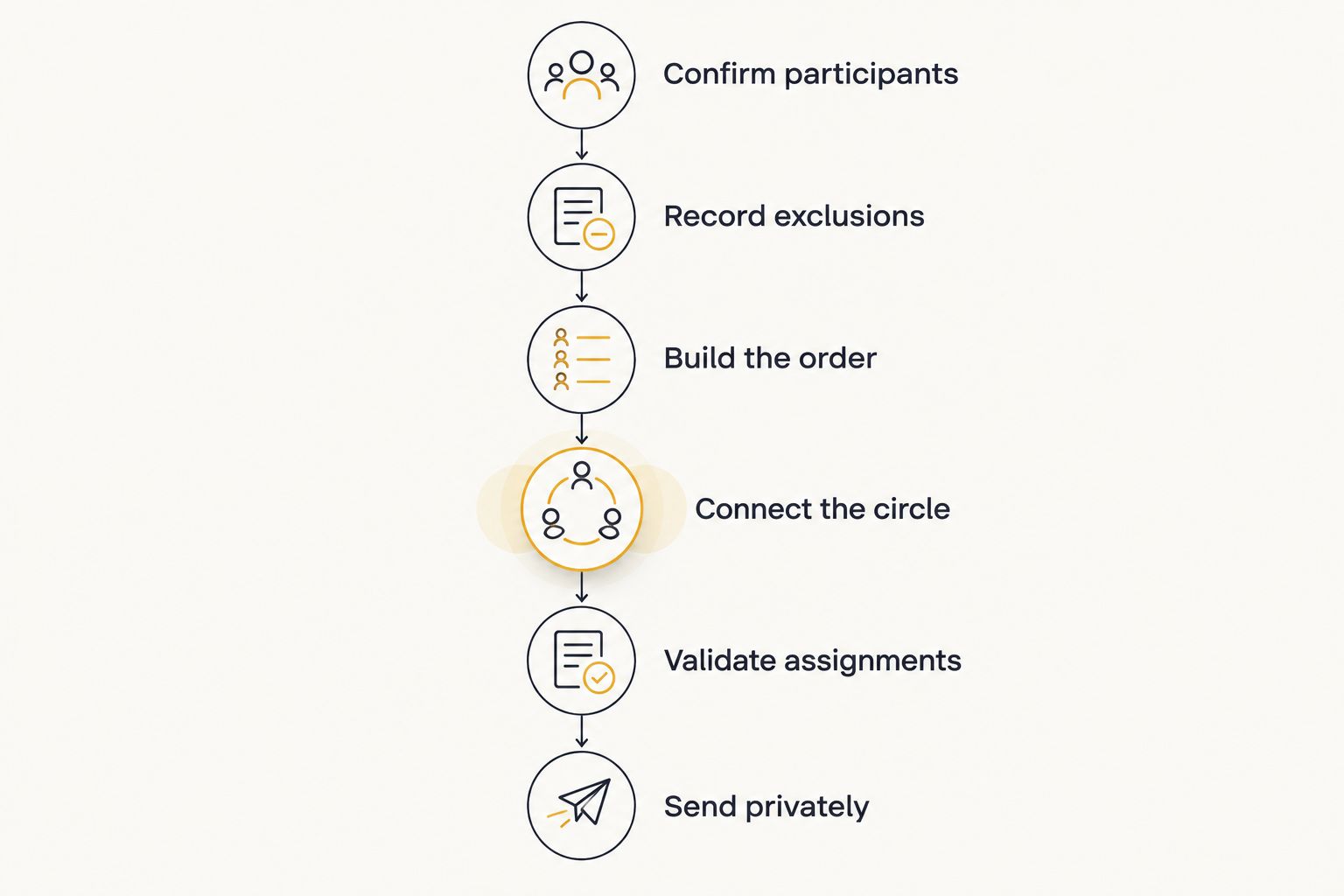
For a 2026 exchange with no restrictions beyond avoiding self-matches, use the wheel to build an order rather than drawing a recipient separately for each giver. Keep a private working list outside the wheel so you can inspect the complete result.
1. Confirm participants
Make a final list of people who have agreed to participate. Use a distinct identifier for each person. If two participants share a first name, distinguish them with an agreed label rather than assuming you will remember which is which.
Remove accidental duplicate entries. Do not include someone twice to increase their chance of selection: Secret Santa needs a one-to-one assignment, not a weighted raffle.
Check that the list contains at least 2 participants. With only 1 participant, an exchange that prohibits self-assignment has no valid result.
2. Record exclusions
Write down restrictions before making selections. These can include no household pairings, no reciprocal pairs, or no repeat of a previous assignment. Ask participants to confirm the rules without publishing sensitive personal explanations.
The circular method handles self-matches, not every possible exclusion. If additional rules apply, check whether a complete assignment is possible and choose a process that handles those rules.
3. Build the order
Add the confirmed names to your wheel. Make a selection, copy that name into the next position in your private ordering, and remove that entry from the remaining list before selecting again.
Continue until every participant appears once in the order. Use the wheel's editing controls to maintain the remaining list; do not assume that an automatic removal setting is enabled. The guide to preventing repeat winners explains the separate problem of repeated selections.
4. Connect the circle
Assign each person to the next person in the completed order. Assign the last person to the first. Do not spin again for recipients after creating this ordering.
For example, an order of Alex, Bailey, Casey, and Drew creates these assignments:
| Giver | Recipient |
|---|---|
| Alex | Bailey |
| Bailey | Casey |
| Casey | Drew |
| Drew | Alex |
This illustrative group has 4 participants and 4 assignments. Each person gives once and receives once. Nobody receives their own name.
5. Validate assignments
Check the giver list against the confirmed participant list. Then check the recipient list against that same list. Both should contain the same people, with no missing or duplicate entries.
Inspect every row for self-matches and any agreed exclusions. Do not distribute results until the complete assignment passes every check. A valid circle is not necessarily a valid exchange when household restrictions apply.
6. Send privately
Send each giver only their assigned recipient and the shared exchange instructions. Keep the full table away from a projector, classroom display, shared document, or group chat.
Ask participants to confirm that they received an assignment. A delivery check confirms receipt; it does not require participants to reveal their recipient to the group.
Why Secret Santa setup varies
A wheel-based exchange works differently depending on your group's rules. For your 2026 plan, separate selection rules from communication rules. A visible spin does not settle either one automatically.
- Participant identifiers: Shared first names require distinct labels. Otherwise, a recorded result can identify the wrong person.
- Pairing exclusions: Household restrictions or past-recipient restrictions require checks beyond preventing self-matches.
- Repeat handling: Leaving selected names in the recipient pool allows repeated recipients. Remove entries while building the order.
- Result visibility: A public wheel reveals selected names. A private organizer workflow keeps the completed pairing table out of view.
- Late changes: A withdrawal or added participant changes the assignment problem. Follow a documented change procedure instead of silently editing a recipient.
- Organizer participation: The organizer can take part, but inspecting the full pairing table reveals assignments to that person.
These factors determine whether a manual wheel workflow fits. They do not establish that a particular wheel has private delivery, exclusion handling, or assignment validation. Check those functions separately before relying on them.
Is the circular method fair for Secret Santa?
The circular method gives each participant one giver and one recipient when the participant list contains distinct entries. That is an assignment property, not a claim of perfect randomness.
It also restricts the possible results to a single circle. For 4 participants, Alex giving to Bailey while Bailey gives to Alex, alongside Casey and Drew giving to each other, is a valid no-self-match assignment. The single-circle method does not produce that arrangement.
A valid assignment and an unrestricted random assignment are not the same thing. Explain the circular rule before the exchange if participants care about which pairing structures are possible.
For the draw itself, keep each participant represented by one entry while building the order. Avoid intentional weighting. Do not repeatedly redraw because the organizer prefers a different result; redraw only under the rules agreed in advance.
A spinning animation shows that a selection took place. It does not document the selection algorithm or prove equal likelihood. Use documented information about the chosen tool when making claims about how its random selections work.
Can you keep wheel-based Secret Santa results private?
Yes, but privacy comes from your workflow rather than from showing a public wheel. Run the selection without broadcasting the working list, then deliver each completed assignment individually.
For your 2026 classroom exchange, a teacher can manage the list and send each participant only their recipient. Use the school's approved communication process. Keep unrelated student information out of wheel entries and private assignment records.
For an office or family exchange, the same separation applies. Shared instructions belong in the group conversation; recipient names belong in individual messages. A shared spreadsheet is not private merely because participants are asked not to read other rows.
If the organizer must not know the assignments either, this manual process does not meet that requirement. Choose a method whose documented delivery process keeps the complete assignment hidden from the organizer. Do not describe a wheel as secure or anonymous without evidence for that specific feature.
What happens if someone joins or leaves after the draw?
A late change requires checking the whole exchange again. A participant is both a giver and a recipient, so removing a name affects more than that person's own task.
Before sending assignments, the simplest documented rule is to restart the ordering from the updated participant list. Tell the group that the list is final only after everyone confirms participation. That avoids treating provisional results as commitments.
After sending assignments, follow the change rule you agreed beforehand. A circular assignment can sometimes be repaired by reconnecting the people around a departing participant, but the new pairing still needs an exclusion check and private notification.
Do not publish the entire table to explain the correction. Tell affected participants what they need to do, and verify that the revised table still assigns every remaining person once as giver and once as recipient.
A classroom checklist before you send results
For a 2026 classroom activity, settle participation and communication before the draw. A wheel can also choose activity themes or speaking order, but those public selections should remain separate from private gift assignments.
Use this checklist for the exchange itself:
- Confirm who is participating rather than automatically using the class roster.
- Use distinct participant labels without unnecessary personal details.
- Explain the no-self-match rule and any additional exclusions.
- Keep the ordering and pairing table off the shared classroom screen.
- Verify one giver and one recipient per participant.
- Send recipient names through the approved private communication method.
- Explain whom participants should contact if their assignment is missing or unclear.
For families, replace the classroom communication step with individual messages. For clubs or workplace groups, name the organizer responsible for corrections. The assignment checks remain the same.
FAQ
Can a spin the wheel be used for Secret Santa?
Yes, a spin the wheel can be used for Secret Santa when you check the complete assignment and deliver results privately. Use it to build a random participant order, then assign each person to the next person in that order.
How many people do you need for wheel-based Secret Santa?
You need at least 2 participants for an exchange that prohibits self-assignment. With 2 participants, each person must give to the other; additional exclusions can make that exchange impossible.
How do I stop someone from drawing their own name?
Build an order of distinct participants and assign each person to the next person, with the last assigned to the first. This prevents self-matches when at least 2 people participate, but additional pairing restrictions still need checking.
Can I run Secret Santa on Spinthewheelapp?
You can use the Spinthewheelapp random picker wheel to select names while building your participant order. Manage the pairing checks and private recipient messages as separate steps.
Should I remove names after each Secret Santa spin?
Yes, remove each selected name when using spins to build the participant order. Keeping selected entries in the remaining pool allows duplicates and leaves other participants out.
Can everyone watch the Secret Santa wheel?
Everyone should not watch a wheel that reveals the private recipient assignments. Run assignment selections privately; use a separate public wheel for unrelated activity choices if needed.
Does the circular method handle household exclusions?
No, the circular method does not automatically handle household exclusions. Check the completed pairing table against those restrictions before delivery, or choose an assignment process that explicitly supports them.
One last thing
The last assignment is a useful test of the entire process. If the final person has no eligible recipient, earlier individual selections did not guarantee a valid exchange.
For your 2026 exchange, write the rules first, build the complete assignment privately, and inspect it before sending anything. The wheel makes selections; the checked assignment table makes Secret Santa work.


