

Multiple people using the same wheel link does not, by itself, establish a synchronized group spin. A shared address, shared entries, and a shared result are different things; check the wheel’s documented behavior before treating them as equivalent. For a classroom selection, raffle, or tournament that needs one official result, use one host-controlled wheel and show everyone that spin.
- Can multiple people spin the same wheel link at once? Check concurrent access separately from synchronized results.
- Spinthewheelapp offers a free, customizable random picker wheel for classrooms, events, and everyday decisions.
- Use one host-controlled spin when everyone must accept the same winner.
- Test shared entries, result updates, and winner removal before running a group activity.
Can multiple people spin the same wheel link at the same time?
Opening the same link and participating in the same live draw are not equivalent. The first concerns access to a page. The second requires coordination of the spin, result, and any changes to the entry list.
Choose the behavior your activity needs before distributing a link. A food-choice exercise can accept separate results. A raffle needs a defined official draw.
| Setup | Best for | Main benefit | Main limitation |
|---|---|---|---|
| Separate participants using a wheel link | Individual prompts and everyday decisions | Each participant can work independently if the wheel supports concurrent access | A common address does not establish a common result |
| One host spinning while everyone watches | Class participation, raffles, and tournament draws | Everyone follows the same official spin | Participants do not control separate official draws |
| A documented synchronized session | Activities requiring shared live state | Shared behavior is defined by the session’s documented controls | Requires explicit support; a link alone is insufficient |
For classroom selection rules beyond link sharing, see how teachers keep a spin-the-wheel picker fair for students.
Why this matters
A wheel can display identical names on different screens without those screens sharing a live session. Matching entries tell you what each participant sees, not whether a spin on one device controls another.
The practical question is therefore not just whether people can open the page. It is which result counts, who controls the draw, and what happens afterward.
For your 2026 classroom activity, decide those rules before students open the link. This keeps an individual practice spin from being mistaken for an official selection.
Check shared behavior before inviting the group
Use a small rehearsal rather than a live class list or giveaway entrant list. The purpose is to observe behavior, not to measure performance or prove randomness.
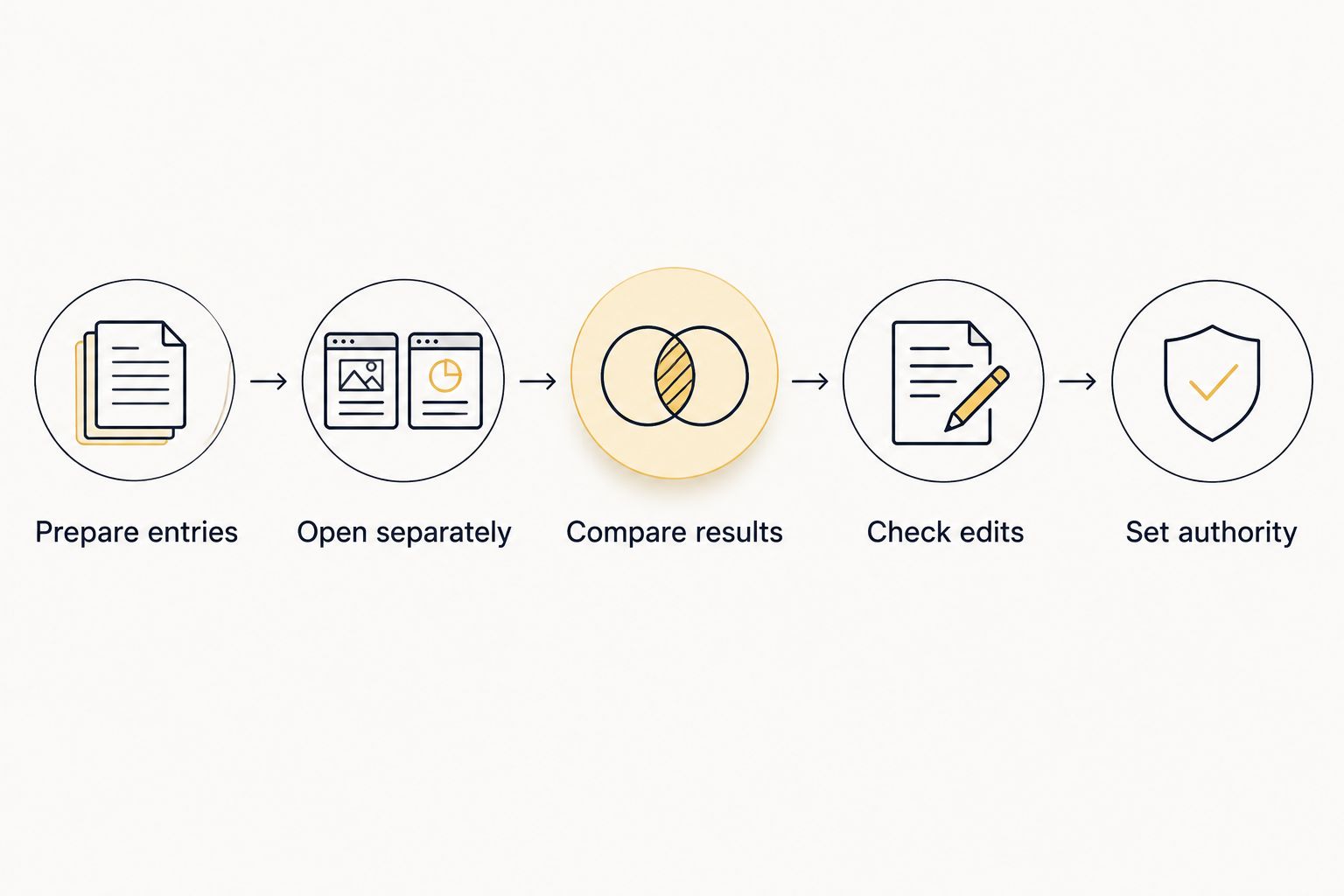
1. Prepare entries
Create a sample list with 3 entries: Reading, Drawing, and Stretching. Use ordinary activity labels rather than student names.
Keep the initial list identical wherever you open it. Different starting entries make it difficult to tell whether later differences came from the sharing behavior or from setup.
2. Open separately
Open the same link in 2 browser sessions, preferably on separate devices. Follow any documented steps for joining a shared session rather than assuming the address does that automatically.
Check what appears on both screens. Record whether the entries match and whether either screen identifies a host, participant, or session.
3. Compare results
Spin from one screen while watching the other. Check whether the other screen starts an animation, displays a result, or remains unchanged.
Then try the other screen. Do not infer synchronization merely because both spins happen to select the same entry; matching outcomes alone do not demonstrate shared state.
4. Check edits
Change an entry on one screen, using the controls available in the wheel. Observe whether the other screen changes without a separate action.
Treat editing as its own test. A shared result does not establish that participants can edit the same list, and matching lists do not establish shared results.
5. Set authority
Write down which screen controls the official draw. State whether participants can spin independently or only watch.
For your 2026 event, keep this rehearsal separate from the official selection. Test spins should not become winners simply because someone saw them first.
Use one host for one official result
Use one host-controlled wheel when the activity needs one accepted result. Display that wheel on a classroom screen or share its screen during an online meeting.
Assign the host before the activity starts. Everyone else watches the same draw rather than submitting results from separate browser sessions.
A practical classroom workflow is:
- Prepare the eligible names or activity choices.
- Explain what the next spin will decide.
- Show the entries before spinning.
- Complete the spin before accepting another request.
- Record the selected entry.
- Apply the announced repeat-selection rule before the next draw.
This setup separates participation from control. Students can suggest choices or take turns requesting a spin without turning every device into an official selection source.
The trade-off is straightforward: the host must manage the list and keep the result visible. If participants need independent practice, a host-only workflow is unnecessary.
For a raffle, do not accept screenshots from separate participant spins as competing official results. Define the host’s displayed result as authoritative before the draw begins, and document any valid reasons for repeating a draw.
Use separate spins for independent activities
Separate spins suit activities where different answers are acceptable. Students choosing a writing prompt do not need everyone to receive the same topic.
Food choices, individual warm-up tasks, and practice exercises can follow the same approach. The important distinction is that each result applies to its own participant rather than to the whole group.
Give a clear instruction: each participant uses the wheel for their own task, and their result does not select a class-wide winner. Confirm concurrent access through documentation or a rehearsal before building the activity around it.
This approach gives participants control over their own pace. Its limitation is coordination: separate results do not create a shared assignment list, prevent duplicate selections across devices, or establish an official group outcome.
For chores, that distinction matters. If everyone needs a different chore, independently spinning identical lists is not enough to establish unique assignments. Use a central assignment process instead.
Why shared wheel behavior varies
The address is only one part of the setup. These factors determine what you need to verify:
- Link purpose. A link can identify a page or configuration without identifying a live group session. Follow the documented meaning of the link.
- Session state. Check whether spins and results belong to an individual browser session or a shared activity.
- Control permissions. Establish who can spin, edit entries, or restart the activity. Do not assume viewers have the host’s controls.
- Update behavior. Test whether changes appear elsewhere automatically or require another action.
- Repeat-selection rules. Confirm whether removing a selected entry affects only the current screen or the whole group.
- Result authority. Decide which result counts when separate screens show different outcomes. This is an activity rule, not something the address decides.
Use these checks when planning a 2026 classroom or event workflow. They are more useful than assuming that every feature described as sharing means multiplayer control.
Keep winner removal separate from link sharing
Removing a winner introduces another coordination requirement. The group must agree not only on the result but also on the remaining eligible entries.
Suppose a classroom activity starts with 3 eligible names. After one official selection, a no-repeat workflow should continue with 2 eligible names. That is a rule for your activity, not a claim about automatic behavior in any particular app.
Check the remaining list on every screen that can produce an official result. If the lists differ, stop and reconcile them before the next draw.
For a host-controlled activity, keep the official remaining list on the host’s screen. Record completed selections separately so a refresh or accidental edit does not force you to reconstruct the activity from memory.
A duplicate selected across separate screens is not, by itself, evidence of a faulty random picker. It can reflect a workflow that allowed the same entry to remain eligible in separate draws.
Where Spinthewheelapp fits
Spinthewheelapp fits teachers who need a free, customizable random picker wheel. Its stated uses include names, prizes, yes/no decisions, numbers, and food choices, serving teachers, event organizers, and streamers.
Use Spinthewheelapp to prepare the choices for your activity. Decide separately whether the activity requires independent choices or one host-controlled result.
Spinthewheelapp’s relevant benefit is the editable wheel format across those use cases. The limitation for this question is that a customizable random picker and a synchronized multiplayer session are different capabilities; establish shared-session behavior before relying on it.
For a 2026 classroom plan, start with the activity’s rules. A simple visible draw is sufficient when the teacher controls the selection and everyone watches.
Will everyone get the same result from the same link?
The same link does not guarantee the same result. Identical entries establish a common starting list, not a common live draw. If everyone needs the same result, show one official spin or use a documented synchronized session.
Can students each spin for their own activity?
Independent spins are appropriate when each student’s result applies only to that student. Check that the chosen wheel supports the intended access, then explain that separate results do not allocate unique tasks across the class. Use a central draw when assignments must not repeat.
Does deleting a winner update everyone’s wheel?
Do not treat winner removal as a group-wide update unless that behavior is documented and verified. Test removal separately from spinning, because result sharing and entry-list updates are distinct behaviors. Keep one official remaining list when unique winners matter.
Write a short rule before the activity
A useful rule names the operator, the accepted result, and the next action. Avoid vague instructions such as telling everyone to use the link fairly without explaining what counts.
For a host-led classroom selection, state that the teacher controls the official wheel, students watch the displayed result, and the teacher updates eligibility before another spin. For independent practice, state that each student’s spin applies only to their own task.
For a 2026 giveaway or tournament, also define when a draw is complete and how you record it. Do not rerun a completed draw merely because another screen produced a preferred outcome.
Keep the rule visible alongside the entry list. A substitute teacher or co-organizer should be able to follow the process without guessing which browser session is authoritative.
FAQ
Can multiple people spin the same wheel link at once?
A common link does not establish synchronized spinning or shared results. Check concurrent access and shared-session behavior separately; use one host-controlled draw when the group needs one official result.
Will everyone watching get the same winner?
Everyone watching one host’s displayed draw follows the same official result. People spinning separately need documented synchronization before their results can be treated as one shared draw.
How do I check whether a wheel link is synchronized?
Open the link in 2 separate browser sessions and observe whether a spin on one screen updates the other. Test edits and winner removal separately, and confirm the behavior against the wheel’s documentation.
Can I let students spin independently during class?
Independent spins suit tasks where each student can receive a separate result. Confirm the wheel supports your access setup, and use a central assignment process if tasks must be unique.
Is sharing a wheel link the same as sharing my screen?
Sharing a wheel link and sharing your screen are different actions. A link directs people to a page; screen sharing displays the wheel you operate, allowing viewers to follow your official draw.
Can two separate spins choose the same name?
Two separate draws can select the same eligible name. Duplicate outcomes alone do not prove a problem with randomness; decide whether repeat selections are allowed before the activity.
Does Spinthewheelapp provide a free random picker wheel?
Spinthewheelapp is a free web app offering a customizable random picker wheel. Its stated uses include names, prizes, yes/no decisions, numbers, and food choices.
What should I do if participants see different results?
Use the result from the screen designated as official before the draw. If no authority was established, pause the activity and agree on the rules rather than choosing whichever result someone prefers.
One last thing
Do not test synchronization by looking only for matching winners. Separate draws can match, so a matching result does not establish that the screens are connected.
Watch what happens on the second screen when the first screen spins or changes an entry. Then choose the workflow: independent choices for individual tasks, or one controlled draw for a group decision.


