

There is no universal limit on how many names you can add to a random name picker wheel; the maximum depends on the app you use. For a 2026 classroom activity or giveaway, check the app’s documented entry limit and test your complete list before the live draw. Count eligible entries separately from unique people, because repeated names change how the draw represents participants.
- How many names can you add to a random name picker wheel? Check the specific app’s documented entry limit.
- Spinthewheelapp offers a free, customizable random picker wheel for names, prizes, numbers, and everyday choices.
- A classroom roster needs one entry per eligible student when everyone should receive the same representation.
- Test the complete list, check the result display, and decide whether selected names stay eligible.
How many names can you add to a random name picker wheel?
Use the selected app’s documented maximum, not a number borrowed from another wheel. Entry capacity is a product-specific property. The number of names accepted, the readability of the wheel, and the rules for repeat selections are separate checks.
Spinthewheelapp is a free random picker wheel for teachers, event organizers, and streamers who need customizable selections. Its uses include names, prizes, yes/no decisions, numbers, and food choices. Choose the wheel type that matches your task, then check the controls and entry requirements before preparing the final list.
For example, a classroom with 30 eligible students needs 30 entries if each student appears once. A roster containing 30 students does not require extra entries just because you intend to make several selections. Whether a selected student stays in the list is a separate decision.
Before treating any capacity claim as useful, ask what it measures:
- Accepted entries: How many list items the app allows you to enter.
- Unique people: How many different participants those entries represent.
- Visible labels: Whether you can read names on the wheel or in the result display.
- Completed selections: Whether the full list supports the activity you intend to run.
An accepted list is only the start. You still need to verify that the eligible participants are present and that the displayed result identifies the selected person clearly.
Why this matters
A capacity question is usually a preparation question: can you run the activity with your actual roster? For a teacher, that means including the right students. For a raffle organizer, it means representing the eligible entries according to the published rules.
A larger list is not automatically a fairer list. A duplicate, an omitted participant, or an unclear repeat-selection rule changes the process even when the wheel accepts every entry.
Keep capacity and fairness separate in your 2026 activity plan. Capacity answers whether the app accepts the list. Fairness also requires consistent eligibility, clear entry rules, and a documented way to handle selected names.
What should you count before adding names?
Count the unit your activity selects: a person, a ticket, or a group. Each approach serves a different purpose. Mixing them without a rule makes the result difficult to explain.
| Entry approach | Best for | What one entry represents | Advantage | Limitation |
|---|---|---|---|---|
| One name per person | Classroom participation and individual chores | One eligible participant | Makes the roster easy to check | Does not represent extra raffle tickets |
| One identifier per ticket | Raffles that allow multiple valid tickets | One eligible ticket | Preserves the ticket-based entry rule | Requires a reliable ticket-to-person record |
| One label per group | Choosing a team or discussion group | One eligible group | Keeps group selection simple | Does not give every individual the same chance when group sizes differ |
These are list designs, not claims about any app’s supported capacity or features. Choose the design first. Then confirm that the selected tool supports the workflow.
One name per person
Use one entry per eligible participant when the activity gives everyone equal representation. Remove accidental duplicates, but do not merge different people who share a name. Use a distinguishing label that does not reveal unnecessary personal information.
A hypothetical roster with 30 students and 2 students absent needs 28 eligible entries if only present students participate. Write that attendance rule before drawing. Do not change eligibility after seeing a result.
One identifier per ticket
For a ticket-based raffle, count valid tickets rather than unique entrants. Someone with several valid tickets has several entries because the raffle rules define eligibility that way. Keep the ownership record outside the public wheel display.
Do not remove repeated entries merely to make the list look tidy. First distinguish an accidental duplicate from a valid additional ticket. The written entry rules determine which one belongs.
One label per group
Use group labels when you intend to choose a group, not a person. This works for selecting a presentation team, a table to begin an activity, or a household chore group. It does not replace an individual draw.
If a class has 5 groups, a group-selection list needs 5 group entries. Those entries represent groups regardless of their membership sizes. Explain that distinction before the selection.
How do you prepare a name list before spinning?
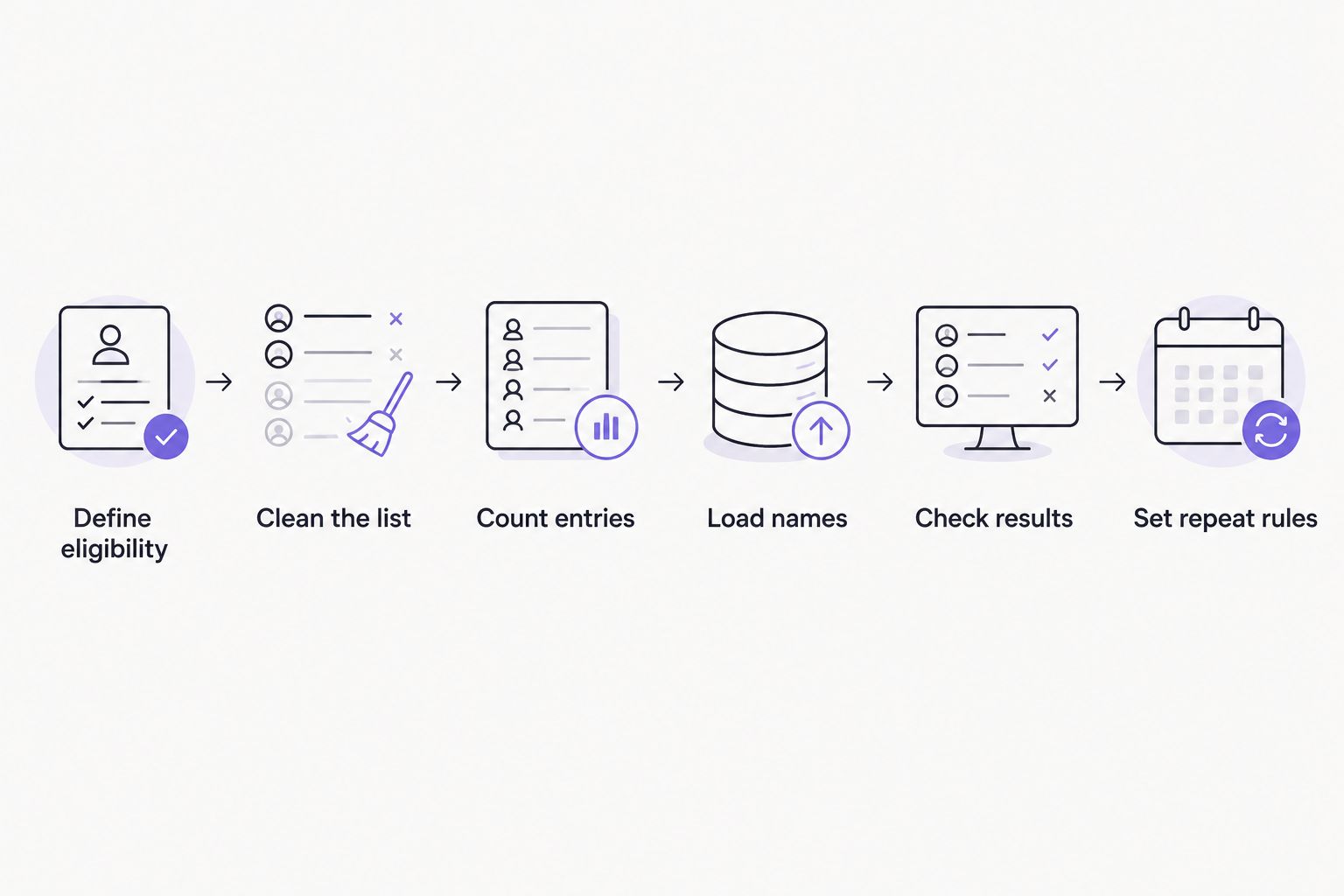
Use this sequence for a classroom roster, a giveaway list, or a tournament draw. It separates eligibility checks from the spin itself. Keep the prepared source list so you can compare it with the entries in the wheel.
- Define eligibility. State who belongs in this draw and who does not. For a classroom, decide whether absent students are excluded.
- Clean the list. Remove blank entries, accidental duplicates, and names that fail the eligibility rule. Preserve legitimate repeated entries in ticket-based draws.
- Count entries. Record the expected total after cleaning. Count entries and unique participants separately when they differ.
- Load names. Follow the app’s supported entry method. If it uses a line-based editor, put one intended entry on each line.
- Check results. Compare the loaded list with your source and run a clearly identified practice selection. Check that you can recognize the selected entry.
- Set repeat rules. Decide whether selected entries remain eligible. Prepare the live list again after practice so the rehearsal does not alter the draw.
For a 2026 classroom routine, keep a short instruction beside the roster: who is eligible, what a selection means, and whether the selected name stays in. A substitute teacher should be able to follow the same rule without reconstructing your plan.
If your roster starts in a spreadsheet, use the Google Sheets name-list workflow to plan the transfer. Check the resulting entries rather than assuming that copying or importing preserved the list exactly.
Why the usable name count varies
The usable count depends on more than an entry-limit statement. It also depends on what you need to see, explain, and record. These checks help you decide whether the complete roster is practical for your activity without guessing a maximum.
- The app’s documented entry limit. Confirm the current limit for the specific app and entry method you intend to use.
- Your eligibility rules. An attendance-based classroom list differs from a complete enrollment roster.
- Your entry unit. A ticket list can contain more entries than the number of people it represents.
- Label clarity. Long names and identical names need a display and identification plan.
- Your display setting. Check the list and result on the actual device or shared screen used for the activity.
- Your repeat-selection rule. Keeping or removing selected entries changes the eligible list during the session.
Do not split a list solely because the wheel looks crowded. First check whether the editor preserves the full roster and whether the result identifies the selected entry clearly. Wheel-label readability and list completeness are different issues.
For your 2026 setup check, use the full intended roster on the intended device. A successful rehearsal with a short sample establishes only that the sample worked. It does not establish that the complete list meets your requirements.
Can you add the same name more than once?
Repeated names should follow the entry rules, not happen accidentally. In a draw that gives every entry equal probability, a person represented by several entries has a greater chance of selection than a person represented once. That is appropriate only when the activity allows it.
For classroom participation, use one entry per eligible student when equal representation is the goal. For a ticket-based giveaway, preserve valid additional tickets. Never treat the two workflows as interchangeable.
If the app offers weighting, check its documented behavior before using it. Do not infer weights from slice appearance or assume that repeated labels and a weight setting behave identically. Explain any intentional difference in representation before spinning.
Should you remove a name after it is picked?
Remove a selected entry when the activity requires selection without replacement. Keep the entry eligible when repeat selections are part of the rules. Decide before the first live spin.
For a classroom speaking order, removing each selected student prevents another turn before the remaining students are selected. For choosing a volunteer on separate occasions, a fresh eligible roster can include previous volunteers. Neither rule is universal.
In a raffle, distinguish removing one winning ticket from removing every ticket belonging to the winner. Those actions produce different remaining lists. Use the giveaway’s written rule, and check whether the selected app supports that action directly or requires manual editing.
Does splitting a large list keep the draw fair?
Splitting a list changes the selection method unless you account for group size. Choosing a group first gives the group a chance of selection; choosing someone within it creates another selection stage. Equal treatment of groups is not equal treatment of people when groups differ in size.
Prefer a complete-list draw when the app supports your roster and the activity requires equal representation per person. If you need a multi-stage draw, document the method before use. Do not describe it as equivalent to a single-list draw without checking the probabilities.
For tournaments, distinguish choosing a player from choosing an existing team. A team-based draw intentionally treats the team as the selection unit. Label the wheel accordingly so participants know what the result means.
FAQ
How many names can I put on a random name picker wheel?
The maximum depends on the specific app, so use its documented entry limit. Test your complete eligible list before a live classroom activity, raffle, or giveaway.
Can I add an unlimited number of names?
Do not assume unlimited capacity unless the selected app explicitly documents it. Check the current entry requirements and verify the complete list on the device you will use.
Is Spinthewheelapp a free random name picker wheel?
Spinthewheelapp is a free web app offering a customizable random picker wheel. Its uses include names, prizes, yes/no decisions, numbers, and food choices.
Do duplicate names give someone more chances to win?
Duplicate entries give a person more chances when every entry has equal selection probability. Keep repeated entries only when they represent valid tickets or another stated entry rule.
Should absent students stay on a classroom name wheel?
Exclude absent students when only students present are eligible for the activity. Apply that rule before spinning and check the roster against attendance.
Can the same person win more than once?
The same person can be selected again if an eligible entry representing that person remains in the draw. Decide whether winners stay eligible before the first selection.
What should I check before using a large name list in 2026?
Check the documented entry limit, roster completeness, result display, and repeat-selection rule. Rehearse with the full list on the device or shared screen you will use.
One last thing
Save the rule beside the list, not just the names. A clean roster does not explain whether a winner stays eligible, whether extra tickets count, or whether absent students participate. Those decisions define the draw.
Before your next activity, write a short instruction covering eligibility, entry representation, and repeats. Then check the loaded list against it. That is more useful than remembering a capacity number from a different app.


