

A random name picker wheel can be used in a GDPR-compliant EU classroom, but the wheel itself does not make the activity compliant. Your school must establish a lawful basis, limit pupil data, understand who receives it, and apply suitable safeguards. For your 2026 assessment, review the actual classroom workflow—including embeds, saved lists, shared links, and browser tracking—not just the spinner.
- Is a random name picker wheel GDPR compliant? Only when the classroom workflow meets GDPR requirements.
- Spinthewheelapp offers a free random picker wheel; that description does not establish GDPR compliance.
- Use lesson topics instead of pupil names when individual identification is unnecessary.
- Pupil codes remain personal data when your school can identify the children behind them.
- Check lawful basis, provider access, retention, tracking, and international transfers before uploading a class list.
Is a random name picker wheel GDPR compliant for EU classrooms?
There is no blanket yes: compliance depends on the data and how you process it. A wheel containing only generic lesson topics raises different pupil-data questions from one containing identifiable names, attendance information, or learning-support labels.
For a 2026 classroom review, GDPR Articles 5 and 6 provide the starting point: processing needs a lawful basis and must meet principles including purpose limitation, data minimisation, and storage limitation. A provider's feature list does not answer those questions.
Use this comparison before preparing a Google Classroom spinner activity.
| Setup | Best for | Practical benefit | Limitation or required check |
|---|---|---|---|
| Generic topics or tasks | Choosing lesson activities | Avoids putting pupil identities in wheel entries | Browser and device data still need review |
| Pupil codes | Selecting individual participants | Reduces direct name exposure | Codes remain personal data if pupils are identifiable |
| First names | A classroom participation draw | Makes results easy to recognise | Class context can identify the pupil |
| Full names | An activity requiring unambiguous identification | Distinguishes pupils with matching names | Requires justification for the additional identifiers |
None of these setups certifies the website. The table compares what you enter, not what the service collects independently.
Why this matters
A classroom spinner combines an instructional decision with a data-handling decision. Choosing who answers a question does not automatically justify sending a class register to an external website.
Embeds need the same attention. A wheel inside a lesson page can still contact an external provider or load third-party resources. Keeping pupils on the school page does not, by itself, keep their data within the school.
Separate fairness from privacy. A fair participation rule concerns who is eligible and how selections work; GDPR concerns lawful, proportionate handling of personal data. You need both, and neither substitutes for the other.
How do you check a classroom wheel before using it?
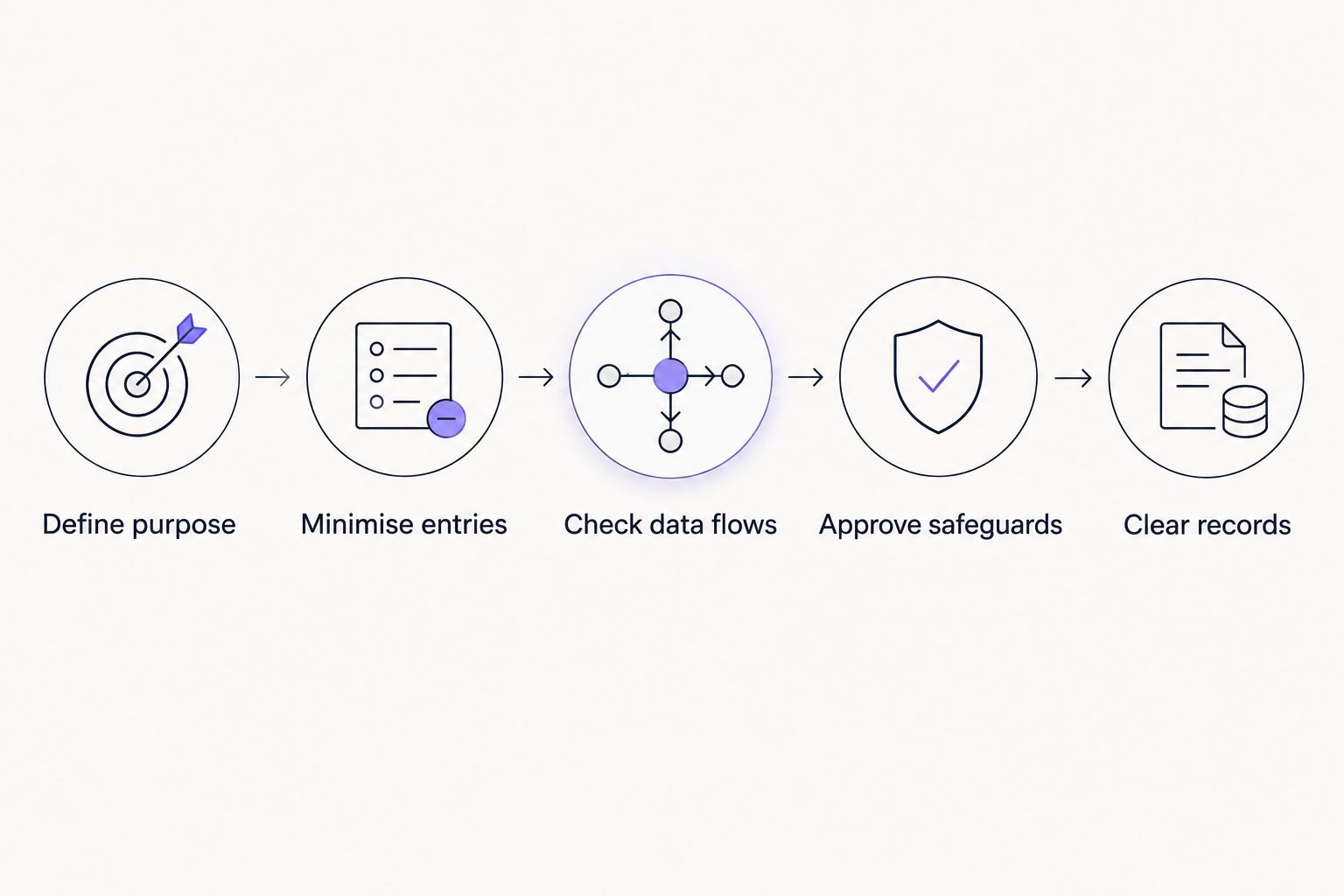
Use this sequence for your 2026 approval record. Follow the school's existing technology-review process rather than creating a separate exception because the tool is simple or free.
1. Define purpose
Write down what the wheel will decide: a discussion topic, a group presentation order, or the next pupil invited to answer. Keep the purpose narrow enough to explain why each entry is necessary.
Ask whether the activity needs individual identification. If you only need a starter question, enter questions rather than names. If you need a presentation order, consider whether group labels will do.
2. Minimise entries
Remove identifiers that do not serve the activity. A participation wheel does not normally need email addresses, birth dates, contact details, or a copied class register with extra columns.
Do not use wheel labels to reveal health information, disability information, or learning-support needs. Health data receives additional protection under GDPR Article 9. An ordinary classroom draw is not a reason to expose it.
3. Check data flows
Establish whether entries remain in the browser, reach a server, appear in a shareable address, or enter saved account records. Also check what happens when you export, embed, reopen, or share the wheel.
Read the provider's current privacy information and technical documentation. Ask for clarification when a description does not distinguish wheel entries from analytics or device data. Do not infer local-only processing from the absence of a login.
4. Approve safeguards
Confirm the lawful basis with the school's responsible staff. Review access controls, retention, tracking, processors, and any transfers outside the European Economic Area.
Record the decision through the school's approval process. Use a synthetic list during review, not real pupil names. Testing the interface is different from authorising it to process school data.
5. Clear records
Set a retention rule tied to the activity. Decide what happens to saved lists, exports, screenshots, shared results, and any provider-held records.
Closing a tab is not proof that all copies are deleted. Follow documented deletion steps and distinguish local deletion from server-side deletion where both exist.
Are first names or pupil codes anonymous?
First names and pupil codes are not automatically anonymous. Personal data includes information relating to an identified or identifiable person. Identification depends on context, not just whether a surname appears.
A first name displayed alongside a class label can identify a child to classmates or staff. A pupil code linked to a register is generally pseudonymised rather than anonymous; GDPR still applies when the pupil can be identified.
Codes can reduce direct exposure without removing your obligations. Keep any lookup list separate from the wheel, restrict access, and avoid placing the lookup in the same shared folder or presentation.
For genuinely non-personal wheel entries, use generic tasks such as reading, drawing, or discussion. That removes pupil identities from the entries, but it does not establish that the website processes no other personal data.
Does a school need parental consent?
Parental consent is not a universal requirement for every classroom wheel. Your school must identify an applicable lawful basis, and the correct basis depends on its responsibilities, national law, and the particular activity.
GDPR Article 8 concerns consent-based information society services offered directly to children. Its default threshold is 16 years, while member states can set a lower threshold of at least 13 years. These thresholds are not blanket permission rules for classroom technology.
Consent also needs to be freely given. The relationship between a school and its pupils can make that assessment difficult, particularly when participation is expected or refusal would disadvantage the child.
For a 2026 classroom approval, do not treat a general permission slip as sufficient evidence. Ask the school's data protection officer or responsible privacy lead to confirm the basis and any required parent or pupil information.
When is a data processing agreement required?
A GDPR Article 28 contract is required when the provider acts as a processor handling personal data on the school's behalf. Its role follows the actual processing arrangement, not the product's name or whether it charges a fee.
A provider can have different roles for different activities. For example, handling school-supplied entries and determining purposes for separate service analytics require distinct analysis.
Check the documented allocation of responsibilities, subprocessors, deletion or return arrangements, and support for the school's obligations. A privacy policy is not automatically a substitute for the required processor contract.
Do not assume every wheel provider is a processor. Establish what the provider does with each relevant category of data before deciding which agreement or other safeguards apply.
Why GDPR requirements vary between classroom wheels
The activity changes when its data flows change. Review these factors rather than relying on a generic compliance label:
- Entry content: Generic topics, names, and health-related labels create different identification and sensitivity issues.
- Processing location: Browser handling, server storage, and exports require different retention and access checks.
- Audience: A teacher-controlled display differs from a public link or an embedded wheel pupils open individually.
- Provider roles: The school must understand which parties determine purposes and which process data on its behalf.
- Tracking: Cookies and similar technologies need a separate assessment under applicable national ePrivacy rules alongside GDPR.
- International transfers: Transfers outside the European Economic Area require an applicable GDPR transfer mechanism where the transfer rules apply.
A school review must consider the configured activity, not just the homepage. Adding a sharing feature or publishing results changes who can receive the data even when the entries remain identical.
Can you use an embedded wheel on a school website?
An embedded wheel needs a data-flow review just like a standalone wheel. Embedding changes the presentation; it does not establish where entries, device information, or other data go.
Distinguish a teacher opening the wheel on a classroom display from pupils loading it on their own devices. The second arrangement introduces pupil visits to the embedded service, which requires its own assessment.
Before publishing, check third-party requests, cookies, shared-link contents, and access to the page. Use generic activity labels until the school approves any identifiable entries and the associated processing.
For your 2026 review, keep the embedding documentation with the classroom activity record. A free embed still needs an approved data workflow.
Is a name wheel suitable for every classroom decision?
Use a wheel for an approved participation activity, not as a substitute for educational judgement. A random draw does not account for a pupil's readiness, support needs, or agreed accommodations.
Keep the eligibility rule clear. If a pupil needs an alternative participation route, handle it privately rather than explaining the reason through a visible wheel label.
Weights, repeat draws, and removal of previous selections concern the selection method. Document those rules separately from privacy controls so pupils understand the activity without seeing information about classmates' needs.
A visible result can help explain the draw, but it also exposes the displayed entry. Show only what the audience needs to see and avoid retaining screenshots merely because they are easy to capture.
Where does Spinthewheelapp fit?
Spinthewheelapp is a free web app with a customisable random picker wheel for names, prizes, yes/no choices, numbers, and food choices. Teachers can use the category of tool for classroom selections; the privacy assessment still depends on the actual configuration and processing.
Spinthewheelapp is best suited to teachers who need a customisable random picker wheel. That functional fit is not a GDPR certification. Its stated description does not establish local-only processing, retention periods, transfer safeguards, or a school processor agreement.
The practical benefit is the range of selection tasks. The boundary is equally important: do not upload an identifiable class list until the school's approval covers that use. Begin with generic lesson topics while the data-handling review is completed.
What should you do if pupil names are exposed?
Follow the school's incident procedure immediately. Restrict access where possible, notify the responsible school staff, and record what was exposed, to whom, and for how long.
GDPR Article 33 sets a supervisory-authority notification deadline of 72 hours after the controller becomes aware of a personal data breach, where notification is required. The exception concerns breaches unlikely to result in a risk to people's rights and freedoms; staff should not make that assessment informally.
Deleting a public link does not establish that nobody accessed or copied it. Preserve the facts needed for the school's assessment without creating unnecessary additional copies of pupil data.
FAQ
Is a random name picker wheel GDPR compliant in an EU classroom?
A random name picker wheel can support a GDPR-compliant classroom activity, but compliance depends on the school’s lawful basis, data minimisation, provider arrangements, and safeguards. Assess the configured workflow rather than assuming the tool is approved.
Can I put only first names on a classroom wheel?
First names can still be personal data when classroom context identifies the pupils. Use them only within the school’s approved workflow and avoid unnecessary additional identifiers.
Are numbered pupil codes anonymous under GDPR?
Pupil codes are not anonymous when the school or another party can identify the children behind them. They can reduce direct exposure, but pseudonymised personal data remains subject to GDPR.
Do I always need parental consent to use a name picker?
Parental consent is not automatically required for every classroom name picker activity. The school must determine an applicable lawful basis; Article 8’s thresholds of 16 years and at least 13 years concern specific consent-based services offered directly to children.
Does embedding a wheel keep pupil data on the school website?
Embedding a wheel does not establish that pupil data stays on the school website. Review the external service’s requests, entry handling, cookies, storage, and sharing behaviour.
Is Spinthewheelapp certified as GDPR compliant for schools?
The app’s stated functions do not establish GDPR certification or approval for school processing. Confirm the relevant documentation and obtain school approval before entering identifiable pupil information.
Does browser-only processing remove every GDPR concern?
Browser-only handling of wheel entries does not remove every GDPR concern. The school still processes the entries, and the website can have separate device-data or tracking flows that need assessment.
One last thing
The simplest privacy improvement is often changing what the wheel chooses. Select a lesson question, a task, or a presentation group before deciding that you need individual pupil names.
For your next classroom activity in 2026, write the purpose first and inspect every proposed entry against it. If an entry does not help that purpose, leave it out. That decision reduces the data burden before you assess any provider.


